What's new - Smarter Contact

Announcement: Smarter Contact has acquired Launch Control to become the undisputed real estate market leader.

What's new


in Smarter Contact?

Our product solutions are built from the collective feedback of users who love us!

September, 2026

Catch Custom Field Typos Before You Send
Enhancement

A misspelled custom field means your lead gets a broken message. That’s a bad first impression you can’t take back.

Now, valid custom fields stand out in Messenger, campaigns, templates, quick replies, call scripts, voicemail, and workflows. Invalid ones are highlighted in red, with a hover tip explaining why. Even better, type < and pick the right field from the list instead of guessing the spelling.

Now, every text is exactly how you meant it.

Never Lose a Lead to a Dropped Call
Enhancement

You’ve got a motivated seller on the line. The last thing you need is choppy audio or a dropped connection. Now, you won’t get either.

Hear Every Word

Your calls now sound better automatically. We’ve added a Call quality setting and switched every account to Auto, so you get the clearest audio your connection can handle without lifting a finger.  It applies to every call you make, 1:1 and dialer, and your very next call picks it up. If your internet is slow, choose Low to keep the call steady. If you’re on a strong connection, choose High for the crispest audio possible.

Clearer calls. Better conversations. More deals.

Stay on the Call

Wi-Fi drops happen. Losing the lead shouldn’t.

If your connection blips, your call now reconnects automatically. No redial, no awkward “sorry, you cut out.” The call button and the dialer Online switch also show exactly what’s happening, with tooltips that tell you when you’re connecting and when something needs your attention. And while a 1:1 call is active, the call button stays locked until you wrap it up, so you’ll never accidentally dial two leads at once.

Say goodbye to silent call failures.

Get Past the Phone Menu

“Press 1 for an agent” no longer stops your dialer campaign.  Press digits on any active dialer call to navigate IVRs, reach extensions, and get to the right person. It works exactly like the keypad on your 1:1 calls.

Start Calling During 10DLC Registration
Enhancement

Submitted your Brand registration? You don’t have to sit and wait. Place 1:1 calls on your messaging numbers while your brand is in review, and buy more 10DLC numbers from the Messaging campaign setup so they’re ready the moment you’re approved.

New and Improved Search
Enhancement

Until now, search covered names and phone numbers. Now, it also covers addresses, emails, parcel details, and every custom field you’ve set up. And when you already know what you’re looking for, you can point search at a single field instead of the whole contact.

A search field that looks where you point it

Click Advanced search and you’ll see two sections.

  • Broad search works the way it always has. Name and phone are both on by default, so you can click the search box and just start typing.
  • Detailed search narrows to one field at a time: email, a piece of an address, a parcel detail, message content, or any custom field. Scoping to a single field is what keeps results fast on large accounts.

Your choice sticks. The field you pick carries across sessions and between Messenger and Contacts, so you don’t reset it every time. A summary line above your results shows which field is selected, what it expects, and how many matched.

Search inside the conversation

Message content search is live in both Messenger and Contacts, under Detailed search alongside address, email, and custom fields. Instead of finding a contact by their details, you can find them by what was actually said in the conversation.

It understands related forms of a word, so searching selling also turns up sells and seller. And your filters still apply, so Unread, Missed calls, and Unreplied keep working alongside it. By default it leaves campaign text out, so one template sent to hundreds of contacts doesn’t bury the reply you’re looking for. Switch to All messages to include it.

How matching works

Names and phone numbers still match on a fragment, so har finds Harold exactly as it does today.

The new fields match whole words instead, with each value split at its punctuation. That means 9549 Elbow Lake Rd answers to elbow, and a dashed APN answers to its middle section. It also means tam won’t find Tampa Bay, and a ZIP needs all five digits.

Search by address, parcel, or your own fields
  • Street, city, state, and ZIP. Each one covers both the property value and the mailing value, so it doesn’t matter which one you stored it in.
  • States take two letters. FL or CA returns results without needing a third character.
  • Parcel details for land investors. APN, parcel county, parcel acres, and parcel state each get their own option under Address.
  • Custom fields under their own names. The seven you use most appear first, and “Show more” opens the rest.

July, 2026

A full term of texts, upfront
New Feature

Quarterly and yearly Elite Plus (Committed use) plans now receive their entire text credit allocation at the start of the cycle, rather than month by month. Quarterly plans get three times the monthly allowance on day one, yearly plans get twelve times. It resets on your renewal date.

That means one date to plan around, and the flexibility to spend your allocation on whatever schedule your pipeline calls for. Front-load a big push in month one, or pace it out. Your call.

Better media sending
Enhancement

Attaching media is more predictable, and you can see what it costs while you build the message.

  • Attachments accumulate. Adding another image adds it to your selection instead of replacing it.
  • Cost as you build. The counter switches to MMS and updates as attachments come and go, so you know the cost before you send rather than after you check your usage.
  • Files or voice, one at a time. Attaching a file pauses recording and starting a recording pauses attaching, with a tooltip explaining why.
More room to say it
Enhancement

Message limits went up across the app. They differ by surface, because each one gets used differently:

  • 1:1 conversations: 10 segments, up from 2. Applies in Messenger, Contacts chats, and workflow messages.
  • Quick replies: 5 segments, up from 2, with a heads up if one runs long.
  • Message templates: 3 segments, up from 2, with the cost shown before you save.
Account Structure
Enhancement

If you run more than one brand, you have been juggling more than one login. Separate credentials, separate tabs, and a sign-out every time you need to check on another business.

With our new multi-account structure. Link all of your brands under one account, see them together, and move between them without signing in and out.  Your account team gets your brands connected, and from there everything lives in one place.

  • All your brands in one dropdown. Open your profile menu and every brand linked to your account is right there, each showing its name and how many sub-accounts it has. No more hunting for the right login.
  • Each brand keeps its own identity. Brands are not just seats. Every brand keeps its own registered sender identity, its own phone numbers, and its own sub-accounts, so nothing gets blurred together across the businesses you run.
  • Jump into any brand in one click. Open any brand in a new tab straight from the dropdown. Your main view stays open in the original tab, so you can hop between brands without losing your place.
  • Billing that fits how you are set up. Keep each brand on its own card, or bill everything centrally. Your account team sets the model that matches your contract, and each brand’s plan and rate show up correctly on its own Membership page.

June, 2026

The Clearest View of Your Number Health
New Feature

We monitor your number health continuously and surface trouble at the very first sign, giving you room to swap in a fresh number and keep your momentum.

  • An in-app heads-up the moment it happens. The AI insights notification identifies the flagged number, recommends switching, and links straight to your campaign settings.
  • A clear signal right where you pick a number. A warning icon appears on the messaging campaign settings page, with a tooltip explaining what’s going on and a link to resolve it.
  • An email so it reaches you anywhere. It names the flagged number and the campaigns it affects, so you stay in the loop even when you’re away from the app.
Advanced Lead Filtering
Enhancement

Every Messenger page features a single, unified Filters panel. You can easily combine multiple parameters to drill down into your leads:

  • Include or exclude specific labels
  • Filter by response date, area code, or marketing campaigns
  • Sort by groups, favorites, or closed deals
One-Click Saved Lead Lists
Enhancement

Build a filter that perfectly targets your hot leads and save it. Saved filters now live in your left-side menu. Build it once. Use it forever.

April, 2026

Automate lead flow with compliance (Opt-in API)
New Feature

Import inbound leads from your website, Facebook Ads, Google Ads, or any external source with consent tracking built in.  

  • Plug & play integrations: Generate a universal Opt-In URL and connect it directly to your Facebook Ads or website using Zapier, Make, or standard web hooks.
  • Automated compliance: New contacts immediately receive a compliant opt-in text message (strictly adhering to your set business hours).
  • Dedicated queueing: Inbound leads are routed to a dedicated Opt-In queue, so your team knows exactly who is waiting for a follow-up and can optimize for speed-to-lead. Even better, add them to a Contact Workflow for automated nurturing. So easy.
  • Audit trail: Every consent interaction is logged in the background (who, when, and how) to protect your business.


Total visibility: No more upsetting text message recipients
New Feature

Have you ever accidentally sent an automated text to a seller while an agent was already calling them? We’ve centralized your communication history, so your team knows exactly what campaigns are touching each contact in your database

  • Smart overlap detection: Our platform will automatically flag contacts enrolled in multiple or conflicting sequences (like active text messaging campaigns, dialer calling campaigns, or scheduled 1:1 messages).
  • Centralized management: Click “Manage outreach sources” right from the Messenger to selectively unschedule a seller from conflicting campaigns and prevent recipient fatigue.


Smarter, cleaner list imports
Enhancement

Data integrity makes or breaks your ROI. We’ve introduced real-time field validation to ensure the health of your database when uploading new lists.

  • Inline warnings: During the mapping phase, the system instantly scans your CSV and flags errors, like phone numbers accidentally hiding in the “Property Address” column. Catch mapping errors before the import executes.

March, 2026

Never miss a lead with unread red bubbles
Mobile Updates | New Feature

See how many unread messages you need to respond to without even opening the mobile app. 

  • Unread messages: red bubble displays unread messages up to 99+.
  • Missed calls: Know whose call you missed so you can call back fast.
  • Real-time sync: unread red bubbles update across our web and mobile apps and follow your OS notification settings.
Complete control with long-press Contact Management
Mobile Updates | New Feature

To prevent accidental actions, we have replaced swipe gestures with a more intentional “Long-Press” menu. Simply long-press a conversation window to access actions.

  • Accessibility: Long-press options are limited when viewing sub-accounts.
  • Delete/Restore: Easily remove or recover contacts directly from your mobile interface.
  • Add to DNC: Instantly move a requested opt-out to your Do Not Contact list.

Faster, smoother performance
Enhancement | Mobile Updates

We have heavily optimized the app under the hood, so it moves as fast as you do.

  • Faster startup: Reduced app load speed opens the app much quicker.
  • Smoother navigation: Experience smooth transitions when switching between conversations, windows, and tabs.
  • Improved list handling: Enjoy snappy responsiveness when managing labels and navigating large contact lists.
New Calling Plans: Scale Without Limits
New Feature

We are introducing two new calling plans designed for high-volume teams: Pro and Elite.


  • Highest Capacity in the Industry: The Elite plan allows up to 20 simultaneous calls. This ensures your large teams can dial continuously without hitting system bottlenecks.
  • Lower Costs: We have reduced per-minute rates for Pro ($0.015) and Elite ($0.01) plans. As you scale, your operational costs decrease.
  • Better Team Management: You can now create sub-accounts to manage teams.
Configurable AI Detection (AMD)
Enhancement

We have upgraded our Answering Machine Detection (AMD) to give you greater control. You can now configure the AI to balance speed versus accuracy based on your campaign data.


  • You Set the Rules: Choose from 5 distinct settings ranging from “Fastest Connection” to “Highest Accuracy.”
  • Reduce Wasted Time: By tuning the AI to your specific campaign needs, your agents spend less time listening to voicemail and more time engaging with live contacts.


Smarter Dialing & Automatic Compliance
Enhancement

We have improved the logic behind our dialer to ensure you remain compliant without manual intervention.

  • Automatic Time Zone Protection: The system now cross-references area codes and automatically prevents calls outside of the 8:00 AM – 9:00 PM window.
  • Local Number Priority: We now route calls through numbers that match your contact’s area code, a strategy proven to increase answer rates.
  • Smart Retries: The system prioritizes new leads and intelligently spaces out retry attempts (max 3 per day) to prevent “burning” your leads and to align with spam mitigation best practices.
Better Visibility
Enhancement

We have enhanced the interface to provide transparency into exactly what is happening with your campaigns.

  • Clear Status Updates: If a campaign pauses, you will see exactly why—whether it’s a daily limit, business hour restriction, or number capacity issue.
  • Easier Provisioning: You can now acquire phone numbers directly inside the campaign setup screen, streamlining your workflow.

February, 2026

Pre-Flight Check
New Feature

Imagine calling a lead to have a personal conversation, only for an automated “Just checking in” text to hit their phone while you are on the line.

We have introduced a new “Pre-Flight Check”. Now, before you send a message or make a call, we scan the contact’s timeline to show you exactly what is already scheduled. You can clean up the queue, prevent overlaps, and ensure every interaction lands perfectly.

January, 2026

New Interactive Trial
New Feature

The new Interactive Trial System allows you to better experience the complete Smarter Contact workflow—from launching campaigns to managing replies—in a simulated environment immediately upon signing up.

  • Instant Access: Start right away with no 10DLC requirements and you automatically get three numbers assigned to your account.
  • Launch Campaigns in Simulation Mode: You can now build and launch SMS campaigns and manage replies without sending messages to real contacts.
  • Full Feature Access: Trial users have access to the core tools needed to build a strategy – Template Library, Contact Management, and Messenger.
  • Seamless Transition to Paid: When you decide to upgrade to a paid plan:
    • Your Contact Groups, Custom Templates, and Account Preferences are retained.
    • The simulated campaign data and fake replies are automatically cleaned up.
Enhanced Compliance Protection
Enhancement

We have expanded our compliance engine to cover more languages and more channels, ensuring you stay within carrier guidelines regardless of how you communicate.

  • Multilingual Content Validation: Our real-time content validation now supports Spanish and other common languages used in the US market.
  • Omni-Channel Protection: We have extended our validation checks to cover every touchpoint in the platform. Content protection now applies to:
    • 1:1 Messaging
    • Campaign Blasts
    • Voicemail Drops (VMDs)
    • Scheduled Messages
    • Contact Workflows
  • AI-Powered Compliance Monitoring: Our system now proactively scans your Contact Workflows and Message Templates to ensure they align with your registered campaign use cases. This helps prevent accidental non-compliance before you even click send.
Visual Capability Indicators
Enhancement

Choosing the right phone number for a specific task just got faster. We’ve added visual indicators to the outbound number selector so you never have to guess a number’s capabilities.

  • Instant Clarity: New icons appear next to each phone number in the dropdown menu.
  • Know Before You Select: See at a glance if a number is SMS/MMS enabled, Voice enabled, or Both.
  • Workflow Efficiency: Whether you need a Dialer-only line for calling or a full-capability number for texting, you can identify and select the correct line instantly.
Calendar Improvements
Enhancement

We have aligned our calendar system with modern industry standards to ensure better accuracy across timezones.

  • Automatic Timezone Detection: All calendar events now automatically display in your browser’s local timezone. You no longer need to make manual adjustments—if you travel or work remotely, your calendar adapts to you.
  • Cleaner Navigation: We improved the visual transitions between months in “Week View,” ensuring abbreviated months and year formatting are always displayed correctly.

December, 2025

Contact Workflows
New Feature

Enroll contacts into a workflow sequence at any time and automate your follow-ups so you
never miss a beat.
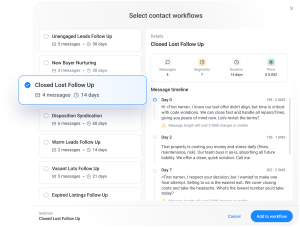
  • Built to be fast: When a contact messages you, you can add them to a workflow right from the conversation.
  • Stop-on-Reply: If a contact responds, the workflow stops automatically so you can take over.
  • Risk-Free: We automatically refund you for any unsent messages if a workflow stops early.
  • Compliance Guard: Automatically blocks DNCs, Opt-outs, and landlines.


Buy Now, Pay Later
New Feature

Buy Now, Pay Later (BNPL) gives you the best of both worlds: the savings of a yearly commitment with the flexibility of a monthly payment.  This allows you to invest in the Enterprise features you need to grow, like high-volume sending and advanced automation, without the upfront cost.

Here is how it works:
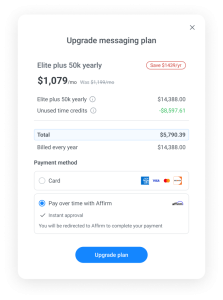
  • Slash Your Costs: Lock in the Yearly rate to save up to $2,159 per year.
  • Pay Over Time: Instead of one lump sum, choose Affirm at checkout to split the cost into manageable monthly installments.
  • Seamless Upgrade: This is available right now for all Enterprise plans. Even if you are on a Trial, you can select this option immediately when you upgrade.
  • Ready to switch? Just head to the Membership page, select a Yearly Enterprise plan, and choose “Affirm” at checkout.

November, 2025

Target with precision
Enhancement

Our improved filtering system gives you the power and flexibility to create follow-ups based on intent or lack thereof.

  • Include or exclude: You can now use this advanced logic to target your audience precisely. Easily stack, combine, and exclude lists by labels.
  • Push anywhere: Once filtered, send your list directly to a new campaign, the dialer, a new group, or Zapier — all from one place.
  • Smarter sorting: Area codes are now sorted logically in the filter so that you can quickly establish local presence.
Manage Campaigns Faster
Enhancement

Your campaigns are now perfectly organized, so that you can find what you need in seconds, not minutes.

  • One place for paused Campaigns: All paused Campaigns (both Standard and Keyword) now live together in one dedicated “Paused” folder.
  • Cleaner Completed folder: Keyword campaigns also get their own Completed folder, just like your other campaigns.
  • More quick follow-ups: You can now create follow-up campaigns and push contacts directly from your Keyword campaigns.
Scale as You Grow
Enhancement

The platform now feels noticeably faster and more responsive, especially if you’re working with thousands of contacts.

  • Faster Contact Loading: Your main Contacts page loads significantly faster.
  • Smarter Search: When creating a campaign, the dropdown search bar now finds any contact list or group, no matter which page it’s on.
  • Backend Boost: We’ve made several performance enhancements to make the whole app feel snappier.
Never miss what matters (and skip what doesn’t)
Enhancement | Mobile Updates

Notifications should help you win, not distract you. Now with notification setting customizations, you can stay informed of what’s most important for you.

  • Total control: Toggle every notification type ON or OFF – labels, calendar reminders, campaign updates, and payments. Your workflow, your rules.
  • Smart defaults: New users get all notifications enabled automatically.
  • Unified hub: One notification center with clear descriptions and smart filtering to enable and disable custom selections.

Organize leads faster than ever
Enhancement | Mobile Updates

In your Messenger window is where deals live or die. Now you can label, favorite, and prioritize all in our mobile app.
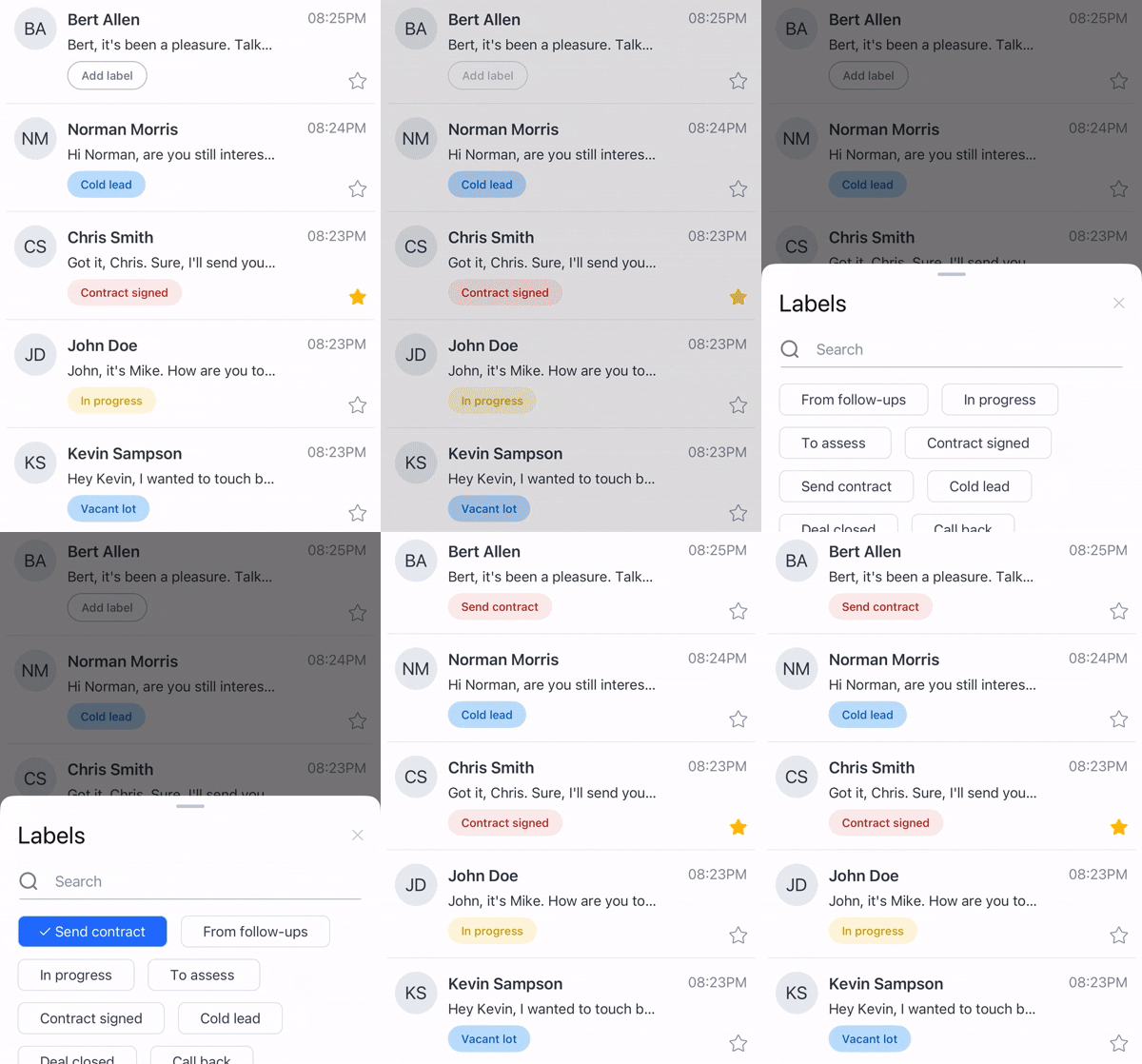
  • One-tap labeling: Add labels directly from your active conversations in Messenger — no navigation, no delays, only instant organization.
  • Favorites that sync: Tap the Star icon for your hottest leads and see them across all devices. Know where to focus the moment you open the app.
  • Advanced search: Find any label in seconds, even if you have hundreds.  Smooth performance, smart sorting, real-time updates.

AI monitors your campaigns 24/7 so you don’t have to
Mobile Updates | New Feature

Your campaigns are your revenue engine. When they stall, deals slip through the cracks. Our AI catches issues before they cost you deals.

  • Instant notifications: Get alerts the moment a campaign pauses. Fix problems in seconds, not hours.
  • Block rate warnings: Every alert tells you exactly what went wrong and how to fix it — no detective work, no support tickets, only quick solutions.
  • Constant lookout: Our AI never sleeps. It monitors performance around the clock so you can focus on closing deals, not troubleshooting tech.

Turn on AI Insights in your notification settings and let the system work for you. More uptime means more conversations, and more conversations mean more deals.

October, 2025

AI compliance that works so you don't have to
Enhancement | Mobile Updates
  • Automatic AI transcription and validation — Every voicemail drop is transcribed and verified to ensure it meets compliance standards.
  • Proactive content scanning — Our AI catches non-compliant language before it reaches contacts, protecting your account while you scale.
  • Seamless file uploads — Upload .mp3 and .wav files with clear size guidance. No format confusion—just drop your audio and go.
  • Real-time validation feedback — Watch compliance checks happen in real time with progress indicators.
  • Automatic library updates — All existing voicemail templates are automatically validated and brought up to current compliance standards.
  • Clearer error messages — When something needs adjustment, you’ll get specific, actionable guidance on what to fix and why.
Enhanced Messenger Security
Enhancement

We’ve extended enterprise-grade compliance protection to better protect you:

  • 1-to-1 message validation — Text and audio messages sent in Messenger conversations undergo a compliance check prior to being sent.
  • Scheduled message protection — Even messages queued for later sending are validated by AI before they’re scheduled.
  • Instant feedback on issues — Get immediate, clear error messages that show exactly what needs fixing.
  • Consistent experience everywhere — Standardized error handling across our app means you always know what needs attention.
Get keyless login access to all accounts
Enhancement

Easily shuffle between your team’s accounts to maintain a high level of accountability and see performance across markets from a bird’s-eye view.

  • One-click access: Switch between primary and sub-accounts with a single click. No more logging in and out, and multiple open tabs.
  • Central command center: Effectively manage your 10DLC status, account settings, and brands from one log in.

Unlock serious savings
Enhancement

We know every dollar counts. That’s why we’re now offering greater savings with longer-term subscriptions, so you can increase your profits even more.

  • Massive savings: Subscribe to our new Enterprise yearly plans directly from the platform and save up to $2,159 per year in perpetuity. That’s money back in your pocket!
  • Full transparency: Upgrade plans and see every cost breakdown instantly—no guesswork, no support tickets, only easy upgraded access with one-click
Get more information in Contacts
Enhancement

Your database is your most valuable asset. Now, it’s more powerful than ever.

  • Email discovery: Enrich your contacts with an email address and add another channel to your campaigns. More ways to connect means more deals in your pipeline.
  • Actionable data: Use these newly discovered emails as custom fields for next-level personalization in your messaging templates.
  • Smarter workflow: Import massive lists faster than ever with our new, streamlined process, all from the Contacts page.
  • Deep property info: Enrich your contacts with essential land data, such as APN, parcel county, and parcel state.
  • Suppress uploaded lists: Import your previously blocked, undeliverable, or opted-out contacts from other systems.

September, 2025

Push Anywhere, Convert Everywhere
New Feature

Manual retargeting and follow-up are now a thing of the past. Think of this as a one-click way to move contacts to the right place at the right time.
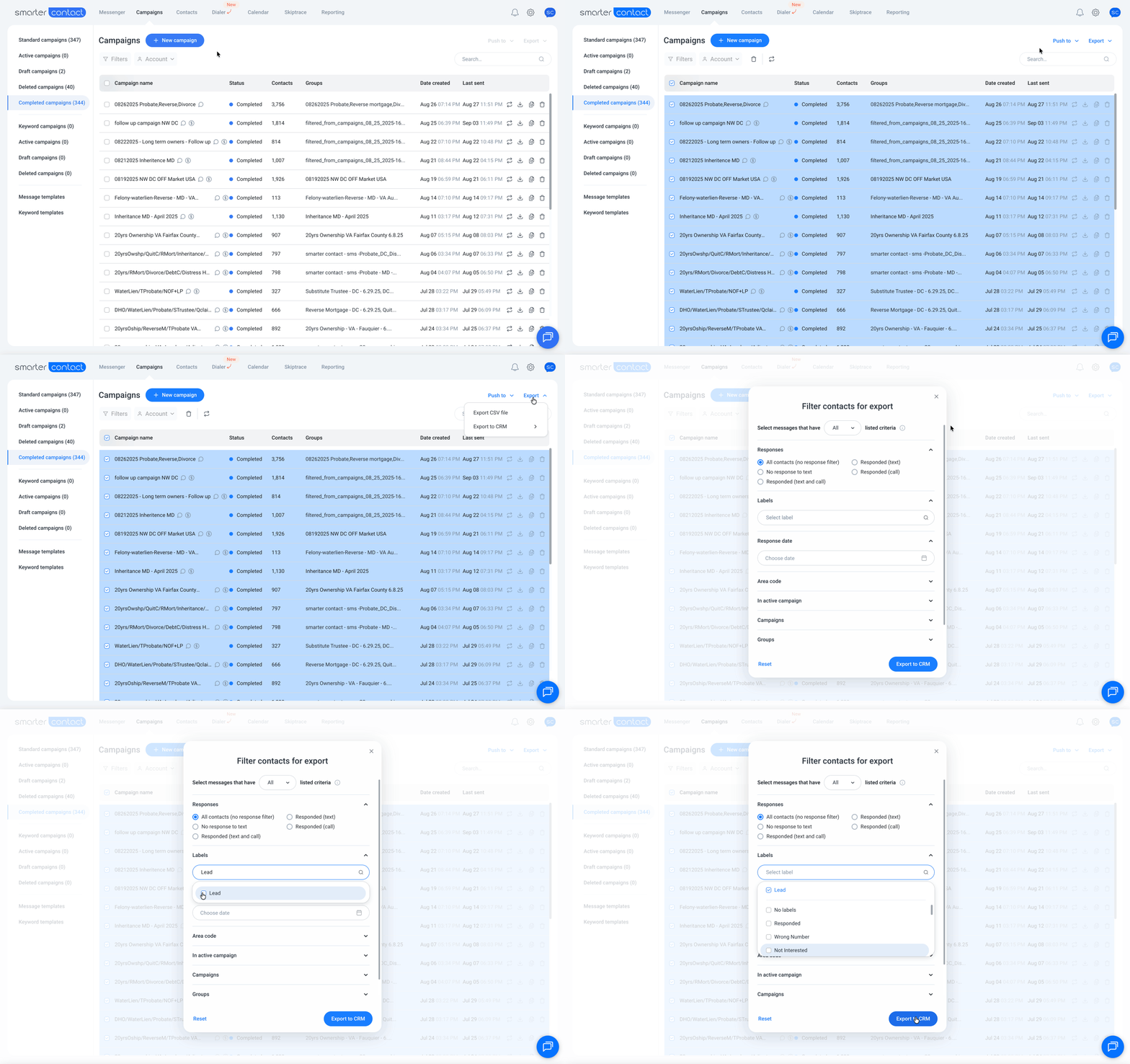
  • Instantly Retarget: Send stale into a new nurture or retargeting sequence with a single click.
  • Move from Text to Call: Filter your non-responders and push them directly to your dialer.
  • Easy Follow Up: Build smarter follow-up sequences that keep leads warm without extra setup.
  • One-Click DNC: Instantly add contacts to your “Do Not Call” list to stay clean and compliant.
  • Bulk Operations: Move contacts across up to 25 campaigns at once.

Export Everything, Analyze Anything
Enhancement

Your data is your goldmine. We’ve made it easier to put that data to work, whether you’re syncing with a CRM or using AI to find your next opportunity.

  • AI-Ready Data: Get enriched, structured data ready for AI and analytics tools.
  • Direct CRM Sync: Push campaign data straight to your CRM without the copy-paste nightmare.
  • Lightning-Fast Exports: Pull thousands of records in seconds.
Automate & Accelerate
New Feature

Let our platform do the heavy lifting. These new features automate your workflow so you can spend less time managing campaigns and more time in the field.

  • Smarter Follow-Ups: Use multiple message templates in your drip campaigns to keep leads engaged.
  • Better Filtering: Pinpoint the exact contacts you need with advanced filtering options.
  • Instant Access: Campaigns now load instantly—no more waiting.
Seamless navigation and control
New Feature

You can now manage your calls without skipping a beat.

  • Sticky call controls: Mute, record, or hang up from anywhere in the app, not just the dialer.
  • Seamless navigation: Move between Messenger, Campaigns, Contacts, and more without interrupting calls.
  • One-click return: Jump back to your active dialer campaign with the new “Return to campaign” button.
Fewer interruptions, more focus
New Feature

We’ve added safeguards to keep your workflow smooth.

  • Browser safeguards: Get a confirmation before closing tabs with active calls.
  • One campaign at a time: Only one dialer campaign can run across all tabs, with clear tooltips to guide you.
  • Global notifications: Campaign completion and daily limit alerts show up wherever you are in the app.
Stronger reliability
Enhancement

Better reliability, consistency, and crystal-clear audio quality on every call.

  • Unified sync: 1-on-1 and dialer campaigns now share the same connection for consistency.
  • Rock solid calls: Expect better reliability and audio quality across the board.

August, 2025

Smarter Campaign Management on the Go
Mobile Updates | New Feature

New features designed to make SMS and calling campaign management easier, faster, and more intuitive.

  • Instantly view campaign sources —> Know which campaign each message belongs to right in your chat.
  • Use smart defaults for notifications —> Automatically apply your default label, saving you time and keeping you focused on what matters.
  • Receive friendly balance reminders —> Never miss a message. You’ll get notified when your balance runs low and top up instantly.
  • Enjoy seamless calls and campaign sync —> Make calls with confidence, knowing your campaign data is always up to date.


Multi-campaign follow-ups: Scale your impact
Enhancement

No more juggling campaigns one by one. Now you can build bulk follow-up sequences across thousands of contacts with just a few clicks.
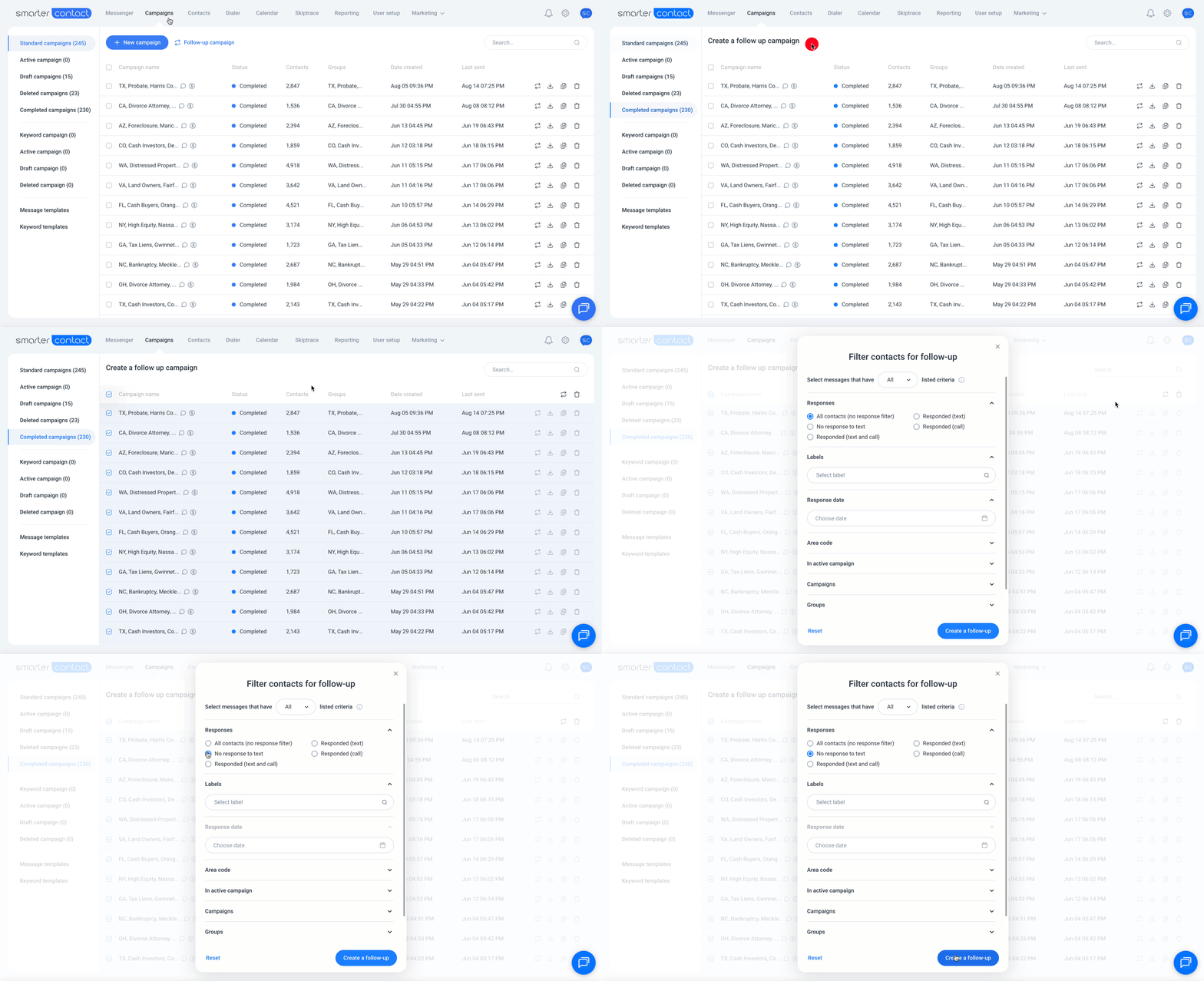
  • Up to 25 campaigns at once → Target contacts across your different audiences.
  • Advanced filters → Segment by campaign, group, response date, area codes, labels and more.
  • Smart phone selection → System automatically uses each contact’s last active number for seamless continuity.
  • Auto-organization → Campaign names and lists are automatically created for you to keep things clean and simple.

Default fields for land investors: Built for maximum efficiency
Enhancement

If you invest in land, this one’s for you. When uploading your data sets, you can easily map default land fields quickly and efficiently.
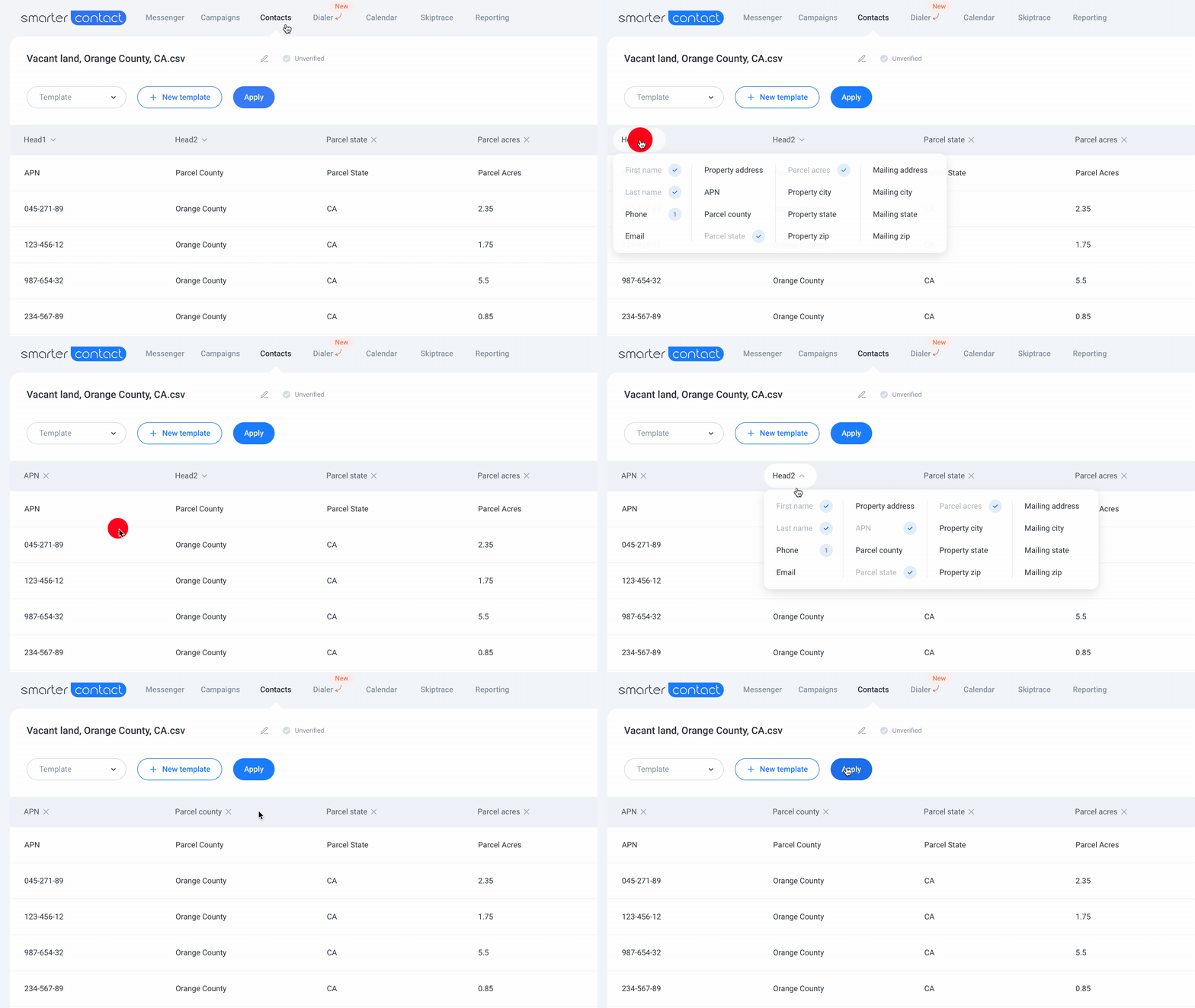
  • Parcel tracking → Save APN, acreage, county, and state fields in your contacts.
  • Smart imports → Upload land lists and auto-map property fields with our field mapping.
  • Integrated workflow → View and edit parcel data in the Info tab without switching screens.
  • CRM-ready exports → All land data carries over when exporting conversations.

Small details, BIG difference
Enhancement

We’ve also polished the experience to keep you focused where it matters most—managing more conversations with greater speed and efficiency to reduce median response time.
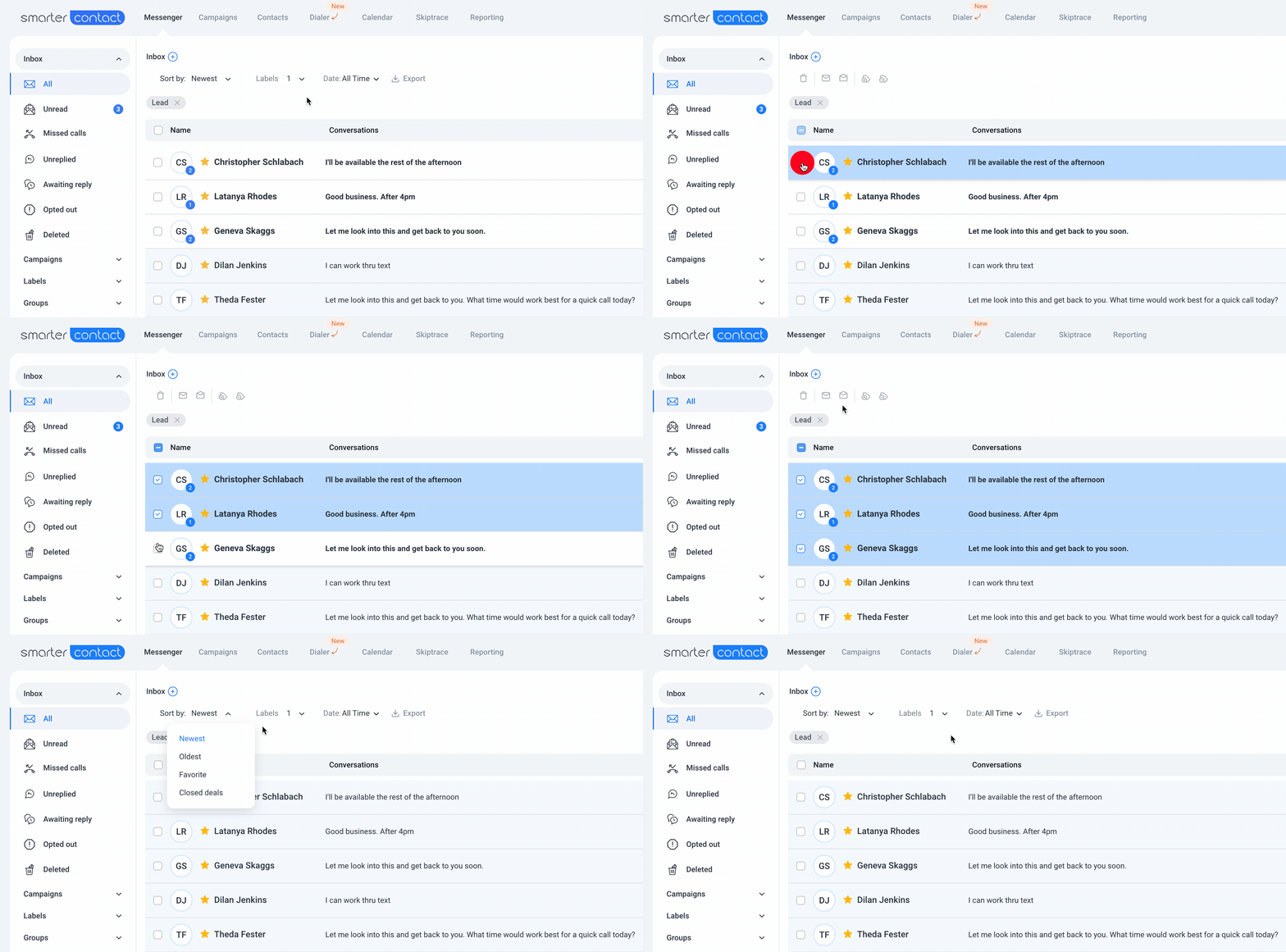
  • Messenger refresh → Unread conversations now stand out in white backgrounds, while read messages sit in a calm blue to enable faster sifting through conversations.
  • Campaign safeguards → Smarter validation now prevents campaigns from starting if your balance is too low or contact lists aren’t compatible.
  • Clean tooltips → Skiptracing hints and subscription status displays are now easier to read.

Export upgrade: Data that looks nice
Enhancement

Your CRM deserves clean data—and now it gets it.

  • Precise timestamps → Every message is exported with timestamps in ISO format.
  • Conversation flow clarity → Sent/received indicators at a glance.
  • Full phone context → Contact and phone numbers included.
  • Structured format → No more hours wasted cleaning up exports.
Calendar Sync: Your schedule, anywhere
New Feature

Say goodbye to juggling multiple calendars by simply integrating your calendar and syncing your Smarter Contact appointments.
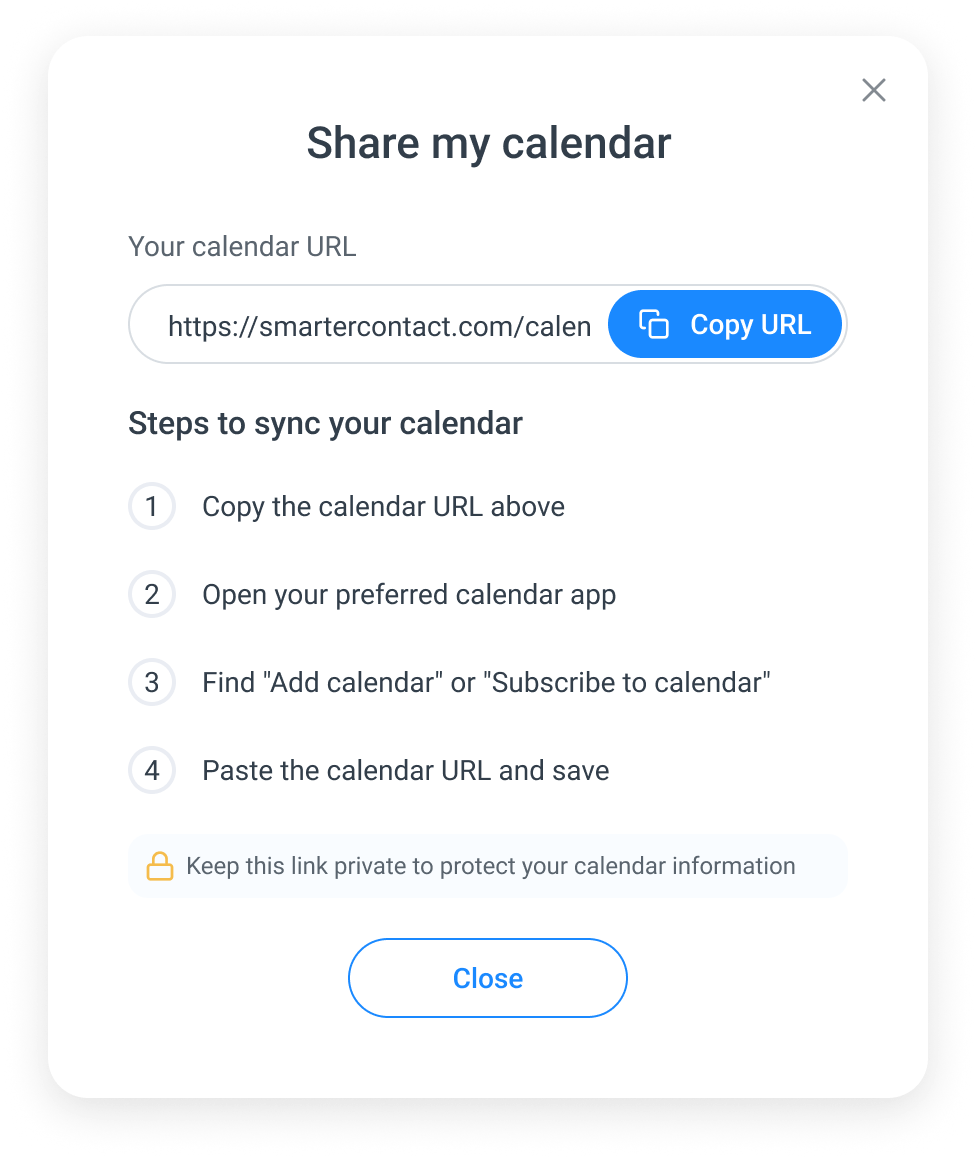
  • Effortless integration: Connect with a secure, one-way sync link.
  • Always up-to-date: Generate a unique URL that automatically updates your external calendar with new Smarter Contact events.
  • Crystal-clear organization: Enjoy improved event management with streamlined views and chronological order, so you’re always prepared for what’s next.

Smarter insights: Optimize every message
New Feature

Unlock deeper understanding of your messaging performance with our new analytical tools.

  • SMS cost efficiency: See exactly how many texting (SMS) segments your campaigns use, helping you optimize templates and control costs.
  • Targeted communication: Visual indicators highlight campaigns with mobile numbers, allowing you to focus texting campaign efforts where they’ll be effective.
  • Real follow-up opportunities: Your dialer now filters for only missed calls, ensuring you prioritize missed opportunities.
  • Enhanced data management: Increased character limits for custom fields mean more detailed and organized contact data.
Enterprise-ready platform: Built for your growth
Enhancement

We’ve significantly upgraded our infrastructure to ensure our platform is more scalable, reliable, and adaptable than ever. Whether you’re a solopreneur or manage a growing team, our software solutions are engineered to meet your performance and volume demands. We can support any texting volumes.

Stay Organized and Informed with Mobile Updates
Enhancement | Mobile Updates

Stay connected and in control with these new updates designed to streamline your workflow and keep you informed while you’re on the go.
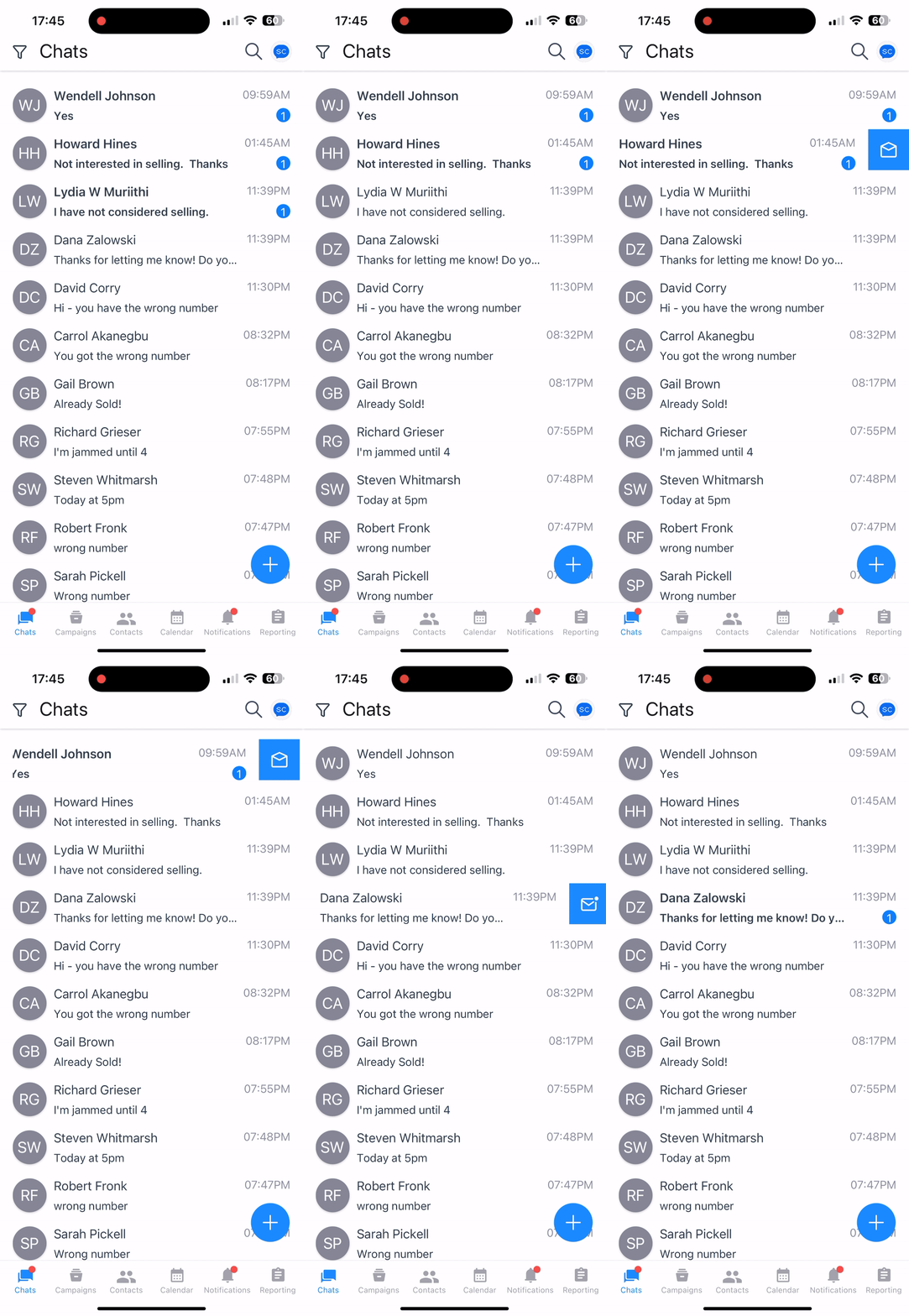
  • Push notifications: You’ll now receive alerts for calendar events, campaigns, and payments. A new notifications center makes it easy to manage everything in one place.
  • Smart reminders: Get notified 10 minutes before meetings, and when campaigns start or end.
  • Swipe to organize: Quickly mark conversations as read or unread with a simple swipe gesture.

  • Improved team access: Main accounts can view all team chats regardless of subscription status.
  • Refreshed profile design: The profile screen has been updated for a cleaner look and better organization.

June, 2025

Turn missed messages into opportunities
Enhancement

Stop guessing who needs follow-up. Track replies and follow up confidently while automation handles the rest.

  • Awaiting reply view: The upgraded Sent folder instantly shows who hasn’t replied and needs follow-up, while the Unreplied messages hub provides a dedicated space for all messages and calls you haven’t responded to.
  • Active campaign visibility: See when contacts are in active campaigns to avoid duplicate follow-ups.
Dial smarter, now including landlines
Enhancement

Expand your reach with landline support while staying protected from messaging errors.

  • Landline support: Call landline numbers directly in Power Dialer to expand your reach and boost conversions.
  • Smart contact handling: Automatically routes calls to landlines and texts to mobile numbers while blocking SMS to landlines for compliance — all seamlessly managed.
Sound natural with personalized voicemail
Enhancement

Build trust and boost response rates using your real voice instead of robotic recordings.

  • Upload your voice: Record voicemails in Calling or Messaging Setup that reflect your tone and personality — your voice, your brand, your results.
Keep your phone numbers healthy
New Feature

Protect your sender reputation and campaign performance with intelligent number management and real-time alerts.

  • Smart campaign management: Get instant warnings when selecting numbers with high block rates, see which numbers are active in other campaigns, and receive data-driven recommendations for optimal performance.
  • Automatic conflict prevention: Intelligent handling prevents number conflicts across campaigns and avoids common mistakes that cause blocks or damage your sender reputation.
Template Quality Checker for improved delivery rates and sending reputation
New Feature

Unique campaign templates preserve your brand’s and phone number’s reputation. This means your carrier block rates will decrease, and your phone number swapping frequency will subsequently decrease.

  • Duplicate check warnings: Get notified when a new template is too similar to existing ones.
  • Real-time checks: Receive instant alerts during template creation to quickly make changes.
  • Campaign template filtering: Automatically filters out overly similar templates when creating campaigns to protect your delivery rates.
  • Similar template warnings: Visual indicators highlight similar templates in your library and offer tips on how to improve them.
  • Brand reputation support: Reduce spam complaints and support better long-term deliverability.
  • Phone number health preservation: Extend the lifespan of your phone numbers and increase campaign performance with communication continuity.
Leverage the Smarter Contact AI template generator!
New Feature

Optimize your operational efficiency and increase campaign performance with better messaging templates leveraging AI. Here’s what you can do with the Smarter Contact AI:

  • Generate 20 unique variations from a single sample message – no more manual tweaks before you nail the right one.
  • Easily switch between classic and AI-generated templates.
  • Save and manage your favorite AI-created templates for future use.
  • Prompt 3 free AI generations every 24 hours – a total of 60 unique messaging templates.
  • Get AI-driven writing tips to help you craft better manual templates.
  • Increase campaign performance with optimal AI messaging templates.
The fastest 10 DLC approval times just got faster
New Feature
  • 99%+ approval rate for new 10 DLC registrations – primary or sub-accounts.
  • Start texting within two business days – guaranteed.
  • We create your website when you choose our expedited service.
  • Skip the standard approval wait time of up to 5 business days.
Long-term drip campaigns – Set it and forget it for an entire year
Enhancement

Now you can schedule drip messages up to a year apart, giving you full control over long-term engagement.

  • Set delays up to 365 days between messages (was 30 days)
  • Chain messages together for multi-year campaigns
  • Simplified interface focused on days, not minutes
  • Smart message randomization (1–30 min) to boost deliverability
  • Sleek new campaign builder for easier planning and clearer navigation
Export your messaging data - AI-powered analysis at your fingertips
New Feature

Export all your messaging campaign data in a structured CSV format, perfect for AI analysis and deep performance insights.

  • One-click CSV export for any date range
  • Secure download links delivered via email (valid for 7 days)
  • AI-optimized formatting for tools like ChatGPT and Claude
  • Instantly compare templates, track performance, and uncover hidden patterns
  • Handles large datasets without slowing down your workflow
Easier Mobile campaign and conversation management
Enhancement | Mobile Updates
  • Push notifications allow you to stay on top of important conversations.
  • Powerful conversation management with previews at your fingertips.
  • Add contacts to your Do Not Contact list in a snap with one-click DNC.
  • Pause, resume, filter, or delete campaigns on your phone – no desktop needed!
Mobile reporting unleashed
Mobile Updates | New Feature
  • Primary accounts can now view and manage ALL sub-account chats.
  • No more jumping between accounts to respond to time-sensitive inquiries or to find important conversations.
  • Seamlessly monitor team performance and customer interactions.

May, 2025

AI response filtering for enhanced protection
New Feature

Our new AI filtering system helps identify opt-out intent in a broader range of messages:

  • Smart AI detection – Messages without explicit opt-out words get filtered when our AI detects opt-out intent
  • Compliance protection – Automatically excludes opted-out contacts across all accounts.
  • Clear labeling – New reporting metrics show you exactly how effective our AI filtering system is.
One-click follow-ups to never miss a beat again
New Feature

Let’s face it – most people need multiple follow-ups before they respond. Now you can create targeted follow-ups in seconds with just one click.

  • Instantly generate follow-ups – Follow up with your non-responsive contacts after the campaign is over.
  • Increase response rate – Use the same phone numbers they’ve seen before.
  • Make it easy – Use our smart defaults that just work.

Check out this video and create your first automated follow-up campaign.

Cleaner contact data to boost your reply rates
New Feature

Your templates will now look significantly more professional and personalized, helping you achieve higher engagement and response rates without any extra effort. No more missed opportunities due to poor formatting!

  • Proper Formatting – Names, addresses, and cities are properly formatted during import.
  • Correct capitalization – ALL CAPS and lowercase text get correctly capitalized.
  • Proper Abbreviations – State names convert to standard 2-letter abbreviations.
Power dialer enhancements increase efficiency
Enhancement

Your calling game just leveled up with tools that make you sound like a pro.

  • See everything in one place – Call recordings appear immediately in your conversation history.
  • Call tracker – Real-time call timer that shows exactly how long you’ve been recording.
  • Scale without limits – Unlimited calling numbers for your dialer campaigns

Watch this quick video to set up your first power dialing campaign in no time.

Dialer Helps Avoid Customer Dissatisfaction
Enhancement
  • Smart business hours enforcement – Prevent users from running dialer campaigns outside of business hours, preventing compliance issues.
Power dialer just got smarter
Enhancement
  • Instant second-call attempts – When someone misses your first call and sees you calling a second time with little delay, they are more likely to answer since your call is perceived as important. Sometimes a double dial is all it takes to make that connection!
  • Never lose track of what was said – Call recordings appear instantly in your conversation history.
  • No more silent calls – Microphone access verification before campaigns start.
  • More reporting visibility – Primary accounts with calling plans can now see sub-account conversations.
Increase engagement with Median response time tracking
New Feature

We all know that timely responses are key in engaging conversations. Now you can:

  • Proper tracking – See precisely how quickly your team responds to messages.
  • Identify bottlenecks – Track performance across your main account and sub-accounts – spot who’s crushing it and who might need a coffee boost.
  • Optimize team’s performance – based on actual data.

January, 2025

Notifications 2.0
Enhancement

Say goodbye to distractions! We’ve redesigned “notifications” to help you stay focused and productive. You can now,

  • Mark all as read – Clear your notifications with a single click.
  • Get meeting reminders – Get notified 10 minutes before your next calendar event.
  • Sleek notification panel – Enjoy a cleaner design with more control.
  • Updated timestamps – No more “0 minutes ago” – you’ll now see “Just now” for recent alerts.

December, 2024

Revolutionize your calling
New Feature

Our Power Dialer is now live. Make 5 calls at once, skip voicemails, view your script and contact info during calls, and record calls with notes. Learn more and boost your productivity today!

Smarter ContactAI Insights
New Feature

Smarter ContactAI is now here to revolutionize your campaigns! Gain actionable insights, eliminate guesswork, and seize every opportunity to improve performance.

  • Phone number health alerts: Stay notified when a number is exhausted to protect your brand reputation.
  • Campaign performance alerts: Underperforming campaigns are paused automatically, with expert reviews to enhance results.
  • Weekly reports: Receive Monday email summaries highlighting exhausted numbers to optimize future campaigns.

Experience smarter, data-driven campaigns like never before!

Unified Account Reporting
New Feature

Primary account holders can now enjoy a unified dashboard to track sub-account performance, seamlessly switch between accounts, and access detailed analytics for data-driven decisions and team performance tracking.

Resizable messenger sidebar
Enhancement

Customize your Messenger experience with a new resizable sidebar. Adjust the width of conversation previews and contact cards to your preference, and enjoy a consistent view across all devices. Learn more

September, 2024

Turbocharged campaign user experience
Enhancement

Handle large campaigns effortlessly with lightning-fast performance, real-time updates every 500 messages, and seamless optimization for any campaign size.

November, 2024

Messenger super performance
Enhancement

Our Messenger has undergone significant improvements, now offering enhanced performance for quicker message loading. Effortlessly browse through extensive conversation histories without any lag.

Smarter campaign preparation
Enhancement

Manage large campaigns with confidence using our new progress loader. You’ll stay updated throughout the campaign preparation process without the need to guess. Learn more

Clear export progress
Enhancement

Monitor data export progress easily with our new indicator for Messenger contacts, providing real-time updates as your data exports.

Easy Phone Number Purchase During Brand Registration
Enhancement

If you’re purchasing phone numbers during brand registration and your balance is low, we’ll prompt you to top up. After recharging, you can quickly return to the search and continue your registration seamlessly.

One-click to top navigation
New Feature

We’ve introduced a “New activity” button in Messenger, letting you quickly navigate to the latest messages or missed activities. Whether it’s an unread message or a missed call, this feature ensures you stay on top of your conversations effortlessly.

Improved macro management
Enhancement

The Macros popup has been revamped for a smoother experience:

  • Improved search: Find macros with ease, even with short queries.
  • Side panel improvements: Macros now appear in the left sidebar, leaving your messages visible.
  • Focused typing: After selecting a macro, your cursor auto-focuses on the text input, ready for seamless typing.
Simplified Enterprise SMS Counter
Enhancement

The Enterprise SMS counter is now more user-friendly, displaying your remaining SMS quota at a glance. You’ll see the updated format: “Outbound SMS remaining 45,000 of 70,000.”

Transparent SMS Charges
Enhancement

Stay informed about SMS usage and charges. Whenever your SMS exceeds one credit, you’ll receive a notification during message creation, ensuring you’re aware of additional charges. Learn more

Customizable Notification Preferences
New Feature

Take control of your notifications. If you prefer fewer interruptions, you can easily toggle off campaign and other notifications—except for critical ones like payment issues, which ensure your account remains active. But hey, an inactive account is not going to get you more leads and deals now, is it?

Real-Time Campaign Notifications
New Feature

Receive instant notifications when a campaign begins or ends. Focus on your results, and let the system notify you when your campaign updates occur. A simple click takes you directly to the campaign details.

Optimized Text Message Delivery
New Feature

For campaigns with over 2,500 contacts, you can select at least three phone numbers to boost delivery rates, reduce carrier blocks, and maintain your phone number reputation—ensuring better reach and higher response rates. Learn more

Read and Unread Status Tracking
New Feature

Easily track your conversations with clear visual indicators showing unread messages and missed calls. You can mark conversations as read or unread to manage them efficiently.

Improved Conversation View
Enhancement

We’ve enhanced the inbox view for better clarity, making it easier to see contact details, message previews, and unread message counts at a glance. Learn more

Support for Longer Text Messages
New Feature

Send longer messages, now up to 306 characters, with an enhanced character counter that keeps track of SMS segments and helps control costs.

Enhanced Contact Export
New Feature

Export contact data across multiple campaigns, groups, or labels with a redesigned UI, making it easier to target and schedule follow-up campaigns. Learn more

Display Full Group Name
Enhancement

The full Group name will now be visible in the Messenger sidebar menu, making it easier to identify your contact groups.

Dedicated Customer Success Reps
New Feature

Every new subscriber is assigned a dedicated Customer Success Representative at no additional cost, here to guide you on your journey to closing your first deal

Free Incoming Texts and Calls
New Feature

Starting May 2, 2023, all incoming texts and calls are free on all plans, translating to significant savings each month.

Call Recording
New Feature

Record your calls and play them back later, enabling you to provide feedback to your team and achieve calling proficiency faster.

Call Auto Reply
New Feature

Set up a custom voicemail message to play when you can’t pick up the phone, adding a personal touch to your communications.

Voicemail Inbox
New Feature

Missed a call? Incoming callers can now leave you a voicemail recording that you can listen to at your convenience.

Toll-Free Numbers
New Feature

In addition to 10DLC numbers, you can now use Toll-Free numbers, which are less regulated and easier to set up. Approvals are much faster, allowing you to start messaging right away.

REISift Integration 2.0
New Feature

We’ve enhanced the integration with the ability to import data from REISift directly into Smarter Contact at the click of a button.

Keyword Campaigns
New Feature

Auto-respond to contacts who text specific keywords, ensuring instant engagement with your audience.

Web Dialing
New Feature

Dial directly from our in-app keypad, streamlining your call workflows.

Enhanced Call Tracking
New Feature

View all incoming, outgoing, and missed calls in the conversation log, making sales activity tracking easier than ever.

Clickable URLs
Enhancement

No need to copy and paste! Click URLs directly from the conversation log on the Messenger page.

Inactive Campaigns Filter
Enhancement

Inactive campaigns no longer display in the Campaigns filter, keeping your view uncluttered.

Enhanced Skiptrace UI
Enhancement

We’ve streamlined the Skiptrace UI for a simpler, more intuitive experience.

Messenger Filters
Mobile Updates | New Feature

Filter conversations by Inbox, Campaigns, Labels, and Groups for efficient management.

Upgraded Export Abilities
Enhancement

You can now export your custom data fields in Messenger, Contacts, and Campaigns, streamlining your data management process.

Messenger Conversation Filters
Enhancement

Find conversations quickly by filtering with custom date ranges. Edit custom header values directly from the contact’s Info tab for easier management.

Campaign Template Selection
Enhancement

Select all message template variants at the beginning of your campaign setup and enjoy an updated UI for easier template selection.

Calendar Event Management
Enhancement

With the new button “View mode,” effortlessly see, edit, and delete event details with a simple click.

Billing History Filtering
New Feature

Filter your billing history by custom date ranges and transaction types, and export all transactions in a .csv file for easy tracking.

REISift Integration
New Feature

Effortlessly sync contacts and records with seamless integration between Smarter Contact and REISift, streamlining your workflows.

Send links in messages
New Feature

You can now add hyperlinks to message templates, making it easier to share information quickly with your customers.

Select phone number for a campaign
New Feature

Choose a specific phone number for each campaign to maintain better organization and flexibility.

Mobile App Launch
Mobile Updates

Hurray! Our user-friendly Mobile App is launched and is now available on iOS and Android! Track and respond to your leads on the go, ensuring you never miss an opportunity.

Push contacts to custom groups
New Feature

Easily push your contacts to a custom Group once a campaign ends. This feature allows you to create advanced follow-up automations, helping you close more sales.

Postponed messages
New Feature

Send messages in your 1-on-1 conversations with a delay (e.g., after 15 minutes), giving you more control over timing.

Phone system toggle
New Feature

Enable or disable incoming calls with a simple toggle, providing greater flexibility in managing calls.

June, 2026

Faster Responses with Quick Replies
Enhancement

Macros have a new name and a better experience: Quick Replies. These are the same time-saving snippets you use to respond to motivated sellers, but with the power-user controls you’ve asked for:

  • Drag to reorder: Arrange replies in the exact order you use them.
  • Bulk actions: Select and delete multiple replies at once safely.
  • Refreshed picker: Easier dropping of a saved reply mid-conversation.

July, 2026

A full term of texts, upfront
New Feature

Quarterly and yearly Elite Plus (Committed use) plans now receive their entire text credit allocation at the start of the cycle, rather than month by month. Quarterly plans get three times the monthly allowance on day one, yearly plans get twelve times. It resets on your renewal date.

That means one date to plan around, and the flexibility to spend your allocation on whatever schedule your pipeline calls for. Front-load a big push in month one, or pace it out. Your call.

June, 2026

The Clearest View of Your Number Health
New Feature

We monitor your number health continuously and surface trouble at the very first sign, giving you room to swap in a fresh number and keep your momentum.

  • An in-app heads-up the moment it happens. The AI insights notification identifies the flagged number, recommends switching, and links straight to your campaign settings.
  • A clear signal right where you pick a number. A warning icon appears on the messaging campaign settings page, with a tooltip explaining what’s going on and a link to resolve it.
  • An email so it reaches you anywhere. It names the flagged number and the campaigns it affects, so you stay in the loop even when you’re away from the app.

April, 2026

Automate lead flow with compliance (Opt-in API)
New Feature

Import inbound leads from your website, Facebook Ads, Google Ads, or any external source with consent tracking built in.  

  • Plug & play integrations: Generate a universal Opt-In URL and connect it directly to your Facebook Ads or website using Zapier, Make, or standard web hooks.
  • Automated compliance: New contacts immediately receive a compliant opt-in text message (strictly adhering to your set business hours).
  • Dedicated queueing: Inbound leads are routed to a dedicated Opt-In queue, so your team knows exactly who is waiting for a follow-up and can optimize for speed-to-lead. Even better, add them to a Contact Workflow for automated nurturing. So easy.
  • Audit trail: Every consent interaction is logged in the background (who, when, and how) to protect your business.


Total visibility: No more upsetting text message recipients
New Feature

Have you ever accidentally sent an automated text to a seller while an agent was already calling them? We’ve centralized your communication history, so your team knows exactly what campaigns are touching each contact in your database

  • Smart overlap detection: Our platform will automatically flag contacts enrolled in multiple or conflicting sequences (like active text messaging campaigns, dialer calling campaigns, or scheduled 1:1 messages).
  • Centralized management: Click “Manage outreach sources” right from the Messenger to selectively unschedule a seller from conflicting campaigns and prevent recipient fatigue.


March, 2026

Never miss a lead with unread red bubbles
Mobile Updates | New Feature

See how many unread messages you need to respond to without even opening the mobile app. 

  • Unread messages: red bubble displays unread messages up to 99+.
  • Missed calls: Know whose call you missed so you can call back fast.
  • Real-time sync: unread red bubbles update across our web and mobile apps and follow your OS notification settings.
Complete control with long-press Contact Management
Mobile Updates | New Feature

To prevent accidental actions, we have replaced swipe gestures with a more intentional “Long-Press” menu. Simply long-press a conversation window to access actions.

  • Accessibility: Long-press options are limited when viewing sub-accounts.
  • Delete/Restore: Easily remove or recover contacts directly from your mobile interface.
  • Add to DNC: Instantly move a requested opt-out to your Do Not Contact list.

New Calling Plans: Scale Without Limits
New Feature

We are introducing two new calling plans designed for high-volume teams: Pro and Elite.


  • Highest Capacity in the Industry: The Elite plan allows up to 20 simultaneous calls. This ensures your large teams can dial continuously without hitting system bottlenecks.
  • Lower Costs: We have reduced per-minute rates for Pro ($0.015) and Elite ($0.01) plans. As you scale, your operational costs decrease.
  • Better Team Management: You can now create sub-accounts to manage teams.

February, 2026

Pre-Flight Check
New Feature

Imagine calling a lead to have a personal conversation, only for an automated “Just checking in” text to hit their phone while you are on the line.

We have introduced a new “Pre-Flight Check”. Now, before you send a message or make a call, we scan the contact’s timeline to show you exactly what is already scheduled. You can clean up the queue, prevent overlaps, and ensure every interaction lands perfectly.

January, 2026

New Interactive Trial
New Feature

The new Interactive Trial System allows you to better experience the complete Smarter Contact workflow—from launching campaigns to managing replies—in a simulated environment immediately upon signing up.

  • Instant Access: Start right away with no 10DLC requirements and you automatically get three numbers assigned to your account.
  • Launch Campaigns in Simulation Mode: You can now build and launch SMS campaigns and manage replies without sending messages to real contacts.
  • Full Feature Access: Trial users have access to the core tools needed to build a strategy – Template Library, Contact Management, and Messenger.
  • Seamless Transition to Paid: When you decide to upgrade to a paid plan:
    • Your Contact Groups, Custom Templates, and Account Preferences are retained.
    • The simulated campaign data and fake replies are automatically cleaned up.

December, 2025

Contact Workflows
New Feature

Enroll contacts into a workflow sequence at any time and automate your follow-ups so you
never miss a beat.

  • Built to be fast: When a contact messages you, you can add them to a workflow right from the conversation.
  • Stop-on-Reply: If a contact responds, the workflow stops automatically so you can take over.
  • Risk-Free: We automatically refund you for any unsent messages if a workflow stops early.
  • Compliance Guard: Automatically blocks DNCs, Opt-outs, and landlines.


Buy Now, Pay Later
New Feature

Buy Now, Pay Later (BNPL) gives you the best of both worlds: the savings of a yearly commitment with the flexibility of a monthly payment.  This allows you to invest in the Enterprise features you need to grow, like high-volume sending and advanced automation, without the upfront cost.

Here is how it works:

  • Slash Your Costs: Lock in the Yearly rate to save up to $2,159 per year.
  • Pay Over Time: Instead of one lump sum, choose Affirm at checkout to split the cost into manageable monthly installments.
  • Seamless Upgrade: This is available right now for all Enterprise plans. Even if you are on a Trial, you can select this option immediately when you upgrade.
  • Ready to switch? Just head to the Membership page, select a Yearly Enterprise plan, and choose “Affirm” at checkout.

November, 2025

AI monitors your campaigns 24/7 so you don’t have to
Mobile Updates | New Feature

Your campaigns are your revenue engine. When they stall, deals slip through the cracks. Our AI catches issues before they cost you deals.

  • Instant notifications: Get alerts the moment a campaign pauses. Fix problems in seconds, not hours.
  • Block rate warnings: Every alert tells you exactly what went wrong and how to fix it — no detective work, no support tickets, only quick solutions.
  • Constant lookout: Our AI never sleeps. It monitors performance around the clock so you can focus on closing deals, not troubleshooting tech.

Turn on AI Insights in your notification settings and let the system work for you. More uptime means more conversations, and more conversations mean more deals.

September, 2025

Push Anywhere, Convert Everywhere
New Feature

Manual retargeting and follow-up are now a thing of the past. Think of this as a one-click way to move contacts to the right place at the right time.

  • Instantly Retarget: Send stale into a new nurture or retargeting sequence with a single click.
  • Move from Text to Call: Filter your non-responders and push them directly to your dialer.
  • Easy Follow Up: Build smarter follow-up sequences that keep leads warm without extra setup.
  • One-Click DNC: Instantly add contacts to your “Do Not Call” list to stay clean and compliant.
  • Bulk Operations: Move contacts across up to 25 campaigns at once.

Automate & Accelerate
New Feature

Let our platform do the heavy lifting. These new features automate your workflow so you can spend less time managing campaigns and more time in the field.

  • Smarter Follow-Ups: Use multiple message templates in your drip campaigns to keep leads engaged.
  • Better Filtering: Pinpoint the exact contacts you need with advanced filtering options.
  • Instant Access: Campaigns now load instantly—no more waiting.
Seamless navigation and control
New Feature

You can now manage your calls without skipping a beat.

  • Sticky call controls: Mute, record, or hang up from anywhere in the app, not just the dialer.
  • Seamless navigation: Move between Messenger, Campaigns, Contacts, and more without interrupting calls.
  • One-click return: Jump back to your active dialer campaign with the new “Return to campaign” button.
Fewer interruptions, more focus
New Feature

We’ve added safeguards to keep your workflow smooth.

  • Browser safeguards: Get a confirmation before closing tabs with active calls.
  • One campaign at a time: Only one dialer campaign can run across all tabs, with clear tooltips to guide you.
  • Global notifications: Campaign completion and daily limit alerts show up wherever you are in the app.

August, 2025

Smarter Campaign Management on the Go
Mobile Updates | New Feature

New features designed to make SMS and calling campaign management easier, faster, and more intuitive.

  • Instantly view campaign sources —> Know which campaign each message belongs to right in your chat.
  • Use smart defaults for notifications —> Automatically apply your default label, saving you time and keeping you focused on what matters.
  • Receive friendly balance reminders —> Never miss a message. You’ll get notified when your balance runs low and top up instantly.
  • Enjoy seamless calls and campaign sync —> Make calls with confidence, knowing your campaign data is always up to date.


Calendar Sync: Your schedule, anywhere
New Feature

Say goodbye to juggling multiple calendars by simply integrating your calendar and syncing your Smarter Contact appointments.

  • Effortless integration: Connect with a secure, one-way sync link.
  • Always up-to-date: Generate a unique URL that automatically updates your external calendar with new Smarter Contact events.
  • Crystal-clear organization: Enjoy improved event management with streamlined views and chronological order, so you’re always prepared for what’s next.

Smarter insights: Optimize every message
New Feature

Unlock deeper understanding of your messaging performance with our new analytical tools.

  • SMS cost efficiency: See exactly how many texting (SMS) segments your campaigns use, helping you optimize templates and control costs.
  • Targeted communication: Visual indicators highlight campaigns with mobile numbers, allowing you to focus texting campaign efforts where they’ll be effective.
  • Real follow-up opportunities: Your dialer now filters for only missed calls, ensuring you prioritize missed opportunities.
  • Enhanced data management: Increased character limits for custom fields mean more detailed and organized contact data.

June, 2025

Keep your phone numbers healthy
New Feature

Protect your sender reputation and campaign performance with intelligent number management and real-time alerts.

  • Smart campaign management: Get instant warnings when selecting numbers with high block rates, see which numbers are active in other campaigns, and receive data-driven recommendations for optimal performance.
  • Automatic conflict prevention: Intelligent handling prevents number conflicts across campaigns and avoids common mistakes that cause blocks or damage your sender reputation.
Template Quality Checker for improved delivery rates and sending reputation
New Feature

Unique campaign templates preserve your brand’s and phone number’s reputation. This means your carrier block rates will decrease, and your phone number swapping frequency will subsequently decrease.

  • Duplicate check warnings: Get notified when a new template is too similar to existing ones.
  • Real-time checks: Receive instant alerts during template creation to quickly make changes.
  • Campaign template filtering: Automatically filters out overly similar templates when creating campaigns to protect your delivery rates.
  • Similar template warnings: Visual indicators highlight similar templates in your library and offer tips on how to improve them.
  • Brand reputation support: Reduce spam complaints and support better long-term deliverability.
  • Phone number health preservation: Extend the lifespan of your phone numbers and increase campaign performance with communication continuity.
Leverage the Smarter Contact AI template generator!
New Feature

Optimize your operational efficiency and increase campaign performance with better messaging templates leveraging AI. Here’s what you can do with the Smarter Contact AI:

  • Generate 20 unique variations from a single sample message – no more manual tweaks before you nail the right one.
  • Easily switch between classic and AI-generated templates.
  • Save and manage your favorite AI-created templates for future use.
  • Prompt 3 free AI generations every 24 hours – a total of 60 unique messaging templates.
  • Get AI-driven writing tips to help you craft better manual templates.
  • Increase campaign performance with optimal AI messaging templates.
The fastest 10 DLC approval times just got faster
New Feature
  • 99%+ approval rate for new 10 DLC registrations – primary or sub-accounts.
  • Start texting within two business days – guaranteed.
  • We create your website when you choose our expedited service.
  • Skip the standard approval wait time of up to 5 business days.
Export your messaging data - AI-powered analysis at your fingertips
New Feature

Export all your messaging campaign data in a structured CSV format, perfect for AI analysis and deep performance insights.

  • One-click CSV export for any date range
  • Secure download links delivered via email (valid for 7 days)
  • AI-optimized formatting for tools like ChatGPT and Claude
  • Instantly compare templates, track performance, and uncover hidden patterns
  • Handles large datasets without slowing down your workflow
Mobile reporting unleashed
Mobile Updates | New Feature
  • Primary accounts can now view and manage ALL sub-account chats.
  • No more jumping between accounts to respond to time-sensitive inquiries or to find important conversations.
  • Seamlessly monitor team performance and customer interactions.

May, 2025

AI response filtering for enhanced protection
New Feature

Our new AI filtering system helps identify opt-out intent in a broader range of messages:

  • Smart AI detection – Messages without explicit opt-out words get filtered when our AI detects opt-out intent
  • Compliance protection – Automatically excludes opted-out contacts across all accounts.
  • Clear labeling – New reporting metrics show you exactly how effective our AI filtering system is.
One-click follow-ups to never miss a beat again
New Feature

Let’s face it – most people need multiple follow-ups before they respond. Now you can create targeted follow-ups in seconds with just one click.

  • Instantly generate follow-ups – Follow up with your non-responsive contacts after the campaign is over.
  • Increase response rate – Use the same phone numbers they’ve seen before.
  • Make it easy – Use our smart defaults that just work.

Check out this video and create your first automated follow-up campaign.

Cleaner contact data to boost your reply rates
New Feature

Your templates will now look significantly more professional and personalized, helping you achieve higher engagement and response rates without any extra effort. No more missed opportunities due to poor formatting!

  • Proper Formatting – Names, addresses, and cities are properly formatted during import.
  • Correct capitalization – ALL CAPS and lowercase text get correctly capitalized.
  • Proper Abbreviations – State names convert to standard 2-letter abbreviations.
Increase engagement with Median response time tracking
New Feature

We all know that timely responses are key in engaging conversations. Now you can:

  • Proper tracking – See precisely how quickly your team responds to messages.
  • Identify bottlenecks – Track performance across your main account and sub-accounts – spot who’s crushing it and who might need a coffee boost.
  • Optimize team’s performance – based on actual data.

December, 2024

Revolutionize your calling
New Feature

Our Power Dialer is now live. Make 5 calls at once, skip voicemails, view your script and contact info during calls, and record calls with notes. Learn more and boost your productivity today!

Smarter ContactAI Insights
New Feature

Smarter ContactAI is now here to revolutionize your campaigns! Gain actionable insights, eliminate guesswork, and seize every opportunity to improve performance.

  • Phone number health alerts: Stay notified when a number is exhausted to protect your brand reputation.
  • Campaign performance alerts: Underperforming campaigns are paused automatically, with expert reviews to enhance results.
  • Weekly reports: Receive Monday email summaries highlighting exhausted numbers to optimize future campaigns.

Experience smarter, data-driven campaigns like never before!

Unified Account Reporting
New Feature

Primary account holders can now enjoy a unified dashboard to track sub-account performance, seamlessly switch between accounts, and access detailed analytics for data-driven decisions and team performance tracking.

November, 2024

One-click to top navigation
New Feature

We’ve introduced a “New activity” button in Messenger, letting you quickly navigate to the latest messages or missed activities. Whether it’s an unread message or a missed call, this feature ensures you stay on top of your conversations effortlessly.

Customizable Notification Preferences
New Feature

Take control of your notifications. If you prefer fewer interruptions, you can easily toggle off campaign and other notifications—except for critical ones like payment issues, which ensure your account remains active. But hey, an inactive account is not going to get you more leads and deals now, is it?

Real-Time Campaign Notifications
New Feature

Receive instant notifications when a campaign begins or ends. Focus on your results, and let the system notify you when your campaign updates occur. A simple click takes you directly to the campaign details.

Optimized Text Message Delivery
New Feature

For campaigns with over 2,500 contacts, you can select at least three phone numbers to boost delivery rates, reduce carrier blocks, and maintain your phone number reputation—ensuring better reach and higher response rates. Learn more

Read and Unread Status Tracking
New Feature

Easily track your conversations with clear visual indicators showing unread messages and missed calls. You can mark conversations as read or unread to manage them efficiently.

Support for Longer Text Messages
New Feature

Send longer messages, now up to 306 characters, with an enhanced character counter that keeps track of SMS segments and helps control costs.

Enhanced Contact Export
New Feature

Export contact data across multiple campaigns, groups, or labels with a redesigned UI, making it easier to target and schedule follow-up campaigns. Learn more

Dedicated Customer Success Reps
New Feature

Every new subscriber is assigned a dedicated Customer Success Representative at no additional cost, here to guide you on your journey to closing your first deal

Free Incoming Texts and Calls
New Feature

Starting May 2, 2023, all incoming texts and calls are free on all plans, translating to significant savings each month.

Call Recording
New Feature

Record your calls and play them back later, enabling you to provide feedback to your team and achieve calling proficiency faster.

Call Auto Reply
New Feature

Set up a custom voicemail message to play when you can’t pick up the phone, adding a personal touch to your communications.

Voicemail Inbox
New Feature

Missed a call? Incoming callers can now leave you a voicemail recording that you can listen to at your convenience.

Toll-Free Numbers
New Feature

In addition to 10DLC numbers, you can now use Toll-Free numbers, which are less regulated and easier to set up. Approvals are much faster, allowing you to start messaging right away.

REISift Integration 2.0
New Feature

We’ve enhanced the integration with the ability to import data from REISift directly into Smarter Contact at the click of a button.

Keyword Campaigns
New Feature

Auto-respond to contacts who text specific keywords, ensuring instant engagement with your audience.

Web Dialing
New Feature

Dial directly from our in-app keypad, streamlining your call workflows.

Enhanced Call Tracking
New Feature

View all incoming, outgoing, and missed calls in the conversation log, making sales activity tracking easier than ever.

Messenger Filters
Mobile Updates | New Feature

Filter conversations by Inbox, Campaigns, Labels, and Groups for efficient management.

Billing History Filtering
New Feature

Filter your billing history by custom date ranges and transaction types, and export all transactions in a .csv file for easy tracking.

REISift Integration
New Feature

Effortlessly sync contacts and records with seamless integration between Smarter Contact and REISift, streamlining your workflows.

Send links in messages
New Feature

You can now add hyperlinks to message templates, making it easier to share information quickly with your customers.

Select phone number for a campaign
New Feature

Choose a specific phone number for each campaign to maintain better organization and flexibility.

Push contacts to custom groups
New Feature

Easily push your contacts to a custom Group once a campaign ends. This feature allows you to create advanced follow-up automations, helping you close more sales.

Postponed messages
New Feature

Send messages in your 1-on-1 conversations with a delay (e.g., after 15 minutes), giving you more control over timing.

Phone system toggle
New Feature

Enable or disable incoming calls with a simple toggle, providing greater flexibility in managing calls.

September, 2026

Catch Custom Field Typos Before You Send
Enhancement

A misspelled custom field means your lead gets a broken message. That’s a bad first impression you can’t take back.

Now, valid custom fields stand out in Messenger, campaigns, templates, quick replies, call scripts, voicemail, and workflows. Invalid ones are highlighted in red, with a hover tip explaining why. Even better, type < and pick the right field from the list instead of guessing the spelling.

Now, every text is exactly how you meant it.

Never Lose a Lead to a Dropped Call
Enhancement

You’ve got a motivated seller on the line. The last thing you need is choppy audio or a dropped connection. Now, you won’t get either.

Hear Every Word

Your calls now sound better automatically. We’ve added a Call quality setting and switched every account to Auto, so you get the clearest audio your connection can handle without lifting a finger.  It applies to every call you make, 1:1 and dialer, and your very next call picks it up. If your internet is slow, choose Low to keep the call steady. If you’re on a strong connection, choose High for the crispest audio possible.

Clearer calls. Better conversations. More deals.

Stay on the Call

Wi-Fi drops happen. Losing the lead shouldn’t.

If your connection blips, your call now reconnects automatically. No redial, no awkward “sorry, you cut out.” The call button and the dialer Online switch also show exactly what’s happening, with tooltips that tell you when you’re connecting and when something needs your attention. And while a 1:1 call is active, the call button stays locked until you wrap it up, so you’ll never accidentally dial two leads at once.

Say goodbye to silent call failures.

Get Past the Phone Menu

“Press 1 for an agent” no longer stops your dialer campaign.  Press digits on any active dialer call to navigate IVRs, reach extensions, and get to the right person. It works exactly like the keypad on your 1:1 calls.

Start Calling During 10DLC Registration
Enhancement

Submitted your Brand registration? You don’t have to sit and wait. Place 1:1 calls on your messaging numbers while your brand is in review, and buy more 10DLC numbers from the Messaging campaign setup so they’re ready the moment you’re approved.

New and Improved Search
Enhancement

Until now, search covered names and phone numbers. Now, it also covers addresses, emails, parcel details, and every custom field you’ve set up. And when you already know what you’re looking for, you can point search at a single field instead of the whole contact.

A search field that looks where you point it

Click Advanced search and you’ll see two sections.

  • Broad search works the way it always has. Name and phone are both on by default, so you can click the search box and just start typing.
  • Detailed search narrows to one field at a time: email, a piece of an address, a parcel detail, message content, or any custom field. Scoping to a single field is what keeps results fast on large accounts.

Your choice sticks. The field you pick carries across sessions and between Messenger and Contacts, so you don’t reset it every time. A summary line above your results shows which field is selected, what it expects, and how many matched.

Search inside the conversation

Message content search is live in both Messenger and Contacts, under Detailed search alongside address, email, and custom fields. Instead of finding a contact by their details, you can find them by what was actually said in the conversation.

It understands related forms of a word, so searching selling also turns up sells and seller. And your filters still apply, so Unread, Missed calls, and Unreplied keep working alongside it. By default it leaves campaign text out, so one template sent to hundreds of contacts doesn’t bury the reply you’re looking for. Switch to All messages to include it.

How matching works

Names and phone numbers still match on a fragment, so har finds Harold exactly as it does today.

The new fields match whole words instead, with each value split at its punctuation. That means 9549 Elbow Lake Rd answers to elbow, and a dashed APN answers to its middle section. It also means tam won’t find Tampa Bay, and a ZIP needs all five digits.

Search by address, parcel, or your own fields
  • Street, city, state, and ZIP. Each one covers both the property value and the mailing value, so it doesn’t matter which one you stored it in.
  • States take two letters. FL or CA returns results without needing a third character.
  • Parcel details for land investors. APN, parcel county, parcel acres, and parcel state each get their own option under Address.
  • Custom fields under their own names. The seven you use most appear first, and “Show more” opens the rest.

July, 2026

Better media sending
Enhancement

Attaching media is more predictable, and you can see what it costs while you build the message.

  • Attachments accumulate. Adding another image adds it to your selection instead of replacing it.
  • Cost as you build. The counter switches to MMS and updates as attachments come and go, so you know the cost before you send rather than after you check your usage.
  • Files or voice, one at a time. Attaching a file pauses recording and starting a recording pauses attaching, with a tooltip explaining why.
More room to say it
Enhancement

Message limits went up across the app. They differ by surface, because each one gets used differently:

  • 1:1 conversations: 10 segments, up from 2. Applies in Messenger, Contacts chats, and workflow messages.
  • Quick replies: 5 segments, up from 2, with a heads up if one runs long.
  • Message templates: 3 segments, up from 2, with the cost shown before you save.
Account Structure
Enhancement

If you run more than one brand, you have been juggling more than one login. Separate credentials, separate tabs, and a sign-out every time you need to check on another business.

With our new multi-account structure. Link all of your brands under one account, see them together, and move between them without signing in and out.  Your account team gets your brands connected, and from there everything lives in one place.

  • All your brands in one dropdown. Open your profile menu and every brand linked to your account is right there, each showing its name and how many sub-accounts it has. No more hunting for the right login.
  • Each brand keeps its own identity. Brands are not just seats. Every brand keeps its own registered sender identity, its own phone numbers, and its own sub-accounts, so nothing gets blurred together across the businesses you run.
  • Jump into any brand in one click. Open any brand in a new tab straight from the dropdown. Your main view stays open in the original tab, so you can hop between brands without losing your place.
  • Billing that fits how you are set up. Keep each brand on its own card, or bill everything centrally. Your account team sets the model that matches your contract, and each brand’s plan and rate show up correctly on its own Membership page.

June, 2026

Advanced Lead Filtering
Enhancement

Every Messenger page features a single, unified Filters panel. You can easily combine multiple parameters to drill down into your leads:

  • Include or exclude specific labels
  • Filter by response date, area code, or marketing campaigns
  • Sort by groups, favorites, or closed deals
One-Click Saved Lead Lists
Enhancement

Build a filter that perfectly targets your hot leads and save it. Saved filters now live in your left-side menu. Build it once. Use it forever.

April, 2026

Smarter, cleaner list imports
Enhancement

Data integrity makes or breaks your ROI. We’ve introduced real-time field validation to ensure the health of your database when uploading new lists.

  • Inline warnings: During the mapping phase, the system instantly scans your CSV and flags errors, like phone numbers accidentally hiding in the “Property Address” column. Catch mapping errors before the import executes.

March, 2026

Faster, smoother performance
Enhancement | Mobile Updates

We have heavily optimized the app under the hood, so it moves as fast as you do.

  • Faster startup: Reduced app load speed opens the app much quicker.
  • Smoother navigation: Experience smooth transitions when switching between conversations, windows, and tabs.
  • Improved list handling: Enjoy snappy responsiveness when managing labels and navigating large contact lists.
Configurable AI Detection (AMD)
Enhancement

We have upgraded our Answering Machine Detection (AMD) to give you greater control. You can now configure the AI to balance speed versus accuracy based on your campaign data.


  • You Set the Rules: Choose from 5 distinct settings ranging from “Fastest Connection” to “Highest Accuracy.”
  • Reduce Wasted Time: By tuning the AI to your specific campaign needs, your agents spend less time listening to voicemail and more time engaging with live contacts.


Smarter Dialing & Automatic Compliance
Enhancement

We have improved the logic behind our dialer to ensure you remain compliant without manual intervention.

  • Automatic Time Zone Protection: The system now cross-references area codes and automatically prevents calls outside of the 8:00 AM – 9:00 PM window.
  • Local Number Priority: We now route calls through numbers that match your contact’s area code, a strategy proven to increase answer rates.
  • Smart Retries: The system prioritizes new leads and intelligently spaces out retry attempts (max 3 per day) to prevent “burning” your leads and to align with spam mitigation best practices.
Better Visibility
Enhancement

We have enhanced the interface to provide transparency into exactly what is happening with your campaigns.

  • Clear Status Updates: If a campaign pauses, you will see exactly why—whether it’s a daily limit, business hour restriction, or number capacity issue.
  • Easier Provisioning: You can now acquire phone numbers directly inside the campaign setup screen, streamlining your workflow.

January, 2026

Enhanced Compliance Protection
Enhancement

We have expanded our compliance engine to cover more languages and more channels, ensuring you stay within carrier guidelines regardless of how you communicate.

  • Multilingual Content Validation: Our real-time content validation now supports Spanish and other common languages used in the US market.
  • Omni-Channel Protection: We have extended our validation checks to cover every touchpoint in the platform. Content protection now applies to:
    • 1:1 Messaging
    • Campaign Blasts
    • Voicemail Drops (VMDs)
    • Scheduled Messages
    • Contact Workflows
  • AI-Powered Compliance Monitoring: Our system now proactively scans your Contact Workflows and Message Templates to ensure they align with your registered campaign use cases. This helps prevent accidental non-compliance before you even click send.
Visual Capability Indicators
Enhancement

Choosing the right phone number for a specific task just got faster. We’ve added visual indicators to the outbound number selector so you never have to guess a number’s capabilities.

  • Instant Clarity: New icons appear next to each phone number in the dropdown menu.
  • Know Before You Select: See at a glance if a number is SMS/MMS enabled, Voice enabled, or Both.
  • Workflow Efficiency: Whether you need a Dialer-only line for calling or a full-capability number for texting, you can identify and select the correct line instantly.
Calendar Improvements
Enhancement

We have aligned our calendar system with modern industry standards to ensure better accuracy across timezones.

  • Automatic Timezone Detection: All calendar events now automatically display in your browser’s local timezone. You no longer need to make manual adjustments—if you travel or work remotely, your calendar adapts to you.
  • Cleaner Navigation: We improved the visual transitions between months in “Week View,” ensuring abbreviated months and year formatting are always displayed correctly.

November, 2025

Target with precision
Enhancement

Our improved filtering system gives you the power and flexibility to create follow-ups based on intent or lack thereof.

  • Include or exclude: You can now use this advanced logic to target your audience precisely. Easily stack, combine, and exclude lists by labels.
  • Push anywhere: Once filtered, send your list directly to a new campaign, the dialer, a new group, or Zapier — all from one place.
  • Smarter sorting: Area codes are now sorted logically in the filter so that you can quickly establish local presence.
Manage Campaigns Faster
Enhancement

Your campaigns are now perfectly organized, so that you can find what you need in seconds, not minutes.

  • One place for paused Campaigns: All paused Campaigns (both Standard and Keyword) now live together in one dedicated “Paused” folder.
  • Cleaner Completed folder: Keyword campaigns also get their own Completed folder, just like your other campaigns.
  • More quick follow-ups: You can now create follow-up campaigns and push contacts directly from your Keyword campaigns.
Scale as You Grow
Enhancement

The platform now feels noticeably faster and more responsive, especially if you’re working with thousands of contacts.

  • Faster Contact Loading: Your main Contacts page loads significantly faster.
  • Smarter Search: When creating a campaign, the dropdown search bar now finds any contact list or group, no matter which page it’s on.
  • Backend Boost: We’ve made several performance enhancements to make the whole app feel snappier.
Never miss what matters (and skip what doesn’t)
Enhancement | Mobile Updates

Notifications should help you win, not distract you. Now with notification setting customizations, you can stay informed of what’s most important for you.

  • Total control: Toggle every notification type ON or OFF – labels, calendar reminders, campaign updates, and payments. Your workflow, your rules.
  • Smart defaults: New users get all notifications enabled automatically.
  • Unified hub: One notification center with clear descriptions and smart filtering to enable and disable custom selections.

Organize leads faster than ever
Enhancement | Mobile Updates

In your Messenger window is where deals live or die. Now you can label, favorite, and prioritize all in our mobile app.

  • One-tap labeling: Add labels directly from your active conversations in Messenger — no navigation, no delays, only instant organization.
  • Favorites that sync: Tap the Star icon for your hottest leads and see them across all devices. Know where to focus the moment you open the app.
  • Advanced search: Find any label in seconds, even if you have hundreds.  Smooth performance, smart sorting, real-time updates.

October, 2025

AI compliance that works so you don't have to
Enhancement | Mobile Updates
  • Automatic AI transcription and validation — Every voicemail drop is transcribed and verified to ensure it meets compliance standards.
  • Proactive content scanning — Our AI catches non-compliant language before it reaches contacts, protecting your account while you scale.
  • Seamless file uploads — Upload .mp3 and .wav files with clear size guidance. No format confusion—just drop your audio and go.
  • Real-time validation feedback — Watch compliance checks happen in real time with progress indicators.
  • Automatic library updates — All existing voicemail templates are automatically validated and brought up to current compliance standards.
  • Clearer error messages — When something needs adjustment, you’ll get specific, actionable guidance on what to fix and why.
Enhanced Messenger Security
Enhancement

We’ve extended enterprise-grade compliance protection to better protect you:

  • 1-to-1 message validation — Text and audio messages sent in Messenger conversations undergo a compliance check prior to being sent.
  • Scheduled message protection — Even messages queued for later sending are validated by AI before they’re scheduled.
  • Instant feedback on issues — Get immediate, clear error messages that show exactly what needs fixing.
  • Consistent experience everywhere — Standardized error handling across our app means you always know what needs attention.
Get keyless login access to all accounts
Enhancement

Easily shuffle between your team’s accounts to maintain a high level of accountability and see performance across markets from a bird’s-eye view.

  • One-click access: Switch between primary and sub-accounts with a single click. No more logging in and out, and multiple open tabs.
  • Central command center: Effectively manage your 10DLC status, account settings, and brands from one log in.

Unlock serious savings
Enhancement

We know every dollar counts. That’s why we’re now offering greater savings with longer-term subscriptions, so you can increase your profits even more.

  • Massive savings: Subscribe to our new Enterprise yearly plans directly from the platform and save up to $2,159 per year in perpetuity. That’s money back in your pocket!
  • Full transparency: Upgrade plans and see every cost breakdown instantly—no guesswork, no support tickets, only easy upgraded access with one-click
Get more information in Contacts
Enhancement

Your database is your most valuable asset. Now, it’s more powerful than ever.

  • Email discovery: Enrich your contacts with an email address and add another channel to your campaigns. More ways to connect means more deals in your pipeline.
  • Actionable data: Use these newly discovered emails as custom fields for next-level personalization in your messaging templates.
  • Smarter workflow: Import massive lists faster than ever with our new, streamlined process, all from the Contacts page.
  • Deep property info: Enrich your contacts with essential land data, such as APN, parcel county, and parcel state.
  • Suppress uploaded lists: Import your previously blocked, undeliverable, or opted-out contacts from other systems.

September, 2025

Export Everything, Analyze Anything
Enhancement

Your data is your goldmine. We’ve made it easier to put that data to work, whether you’re syncing with a CRM or using AI to find your next opportunity.

  • AI-Ready Data: Get enriched, structured data ready for AI and analytics tools.
  • Direct CRM Sync: Push campaign data straight to your CRM without the copy-paste nightmare.
  • Lightning-Fast Exports: Pull thousands of records in seconds.
Stronger reliability
Enhancement

Better reliability, consistency, and crystal-clear audio quality on every call.

  • Unified sync: 1-on-1 and dialer campaigns now share the same connection for consistency.
  • Rock solid calls: Expect better reliability and audio quality across the board.

August, 2025

Multi-campaign follow-ups: Scale your impact
Enhancement

No more juggling campaigns one by one. Now you can build bulk follow-up sequences across thousands of contacts with just a few clicks.

  • Up to 25 campaigns at once → Target contacts across your different audiences.
  • Advanced filters → Segment by campaign, group, response date, area codes, labels and more.
  • Smart phone selection → System automatically uses each contact’s last active number for seamless continuity.
  • Auto-organization → Campaign names and lists are automatically created for you to keep things clean and simple.

Default fields for land investors: Built for maximum efficiency
Enhancement

If you invest in land, this one’s for you. When uploading your data sets, you can easily map default land fields quickly and efficiently.

  • Parcel tracking → Save APN, acreage, county, and state fields in your contacts.
  • Smart imports → Upload land lists and auto-map property fields with our field mapping.
  • Integrated workflow → View and edit parcel data in the Info tab without switching screens.
  • CRM-ready exports → All land data carries over when exporting conversations.

Small details, BIG difference
Enhancement

We’ve also polished the experience to keep you focused where it matters most—managing more conversations with greater speed and efficiency to reduce median response time.

  • Messenger refresh → Unread conversations now stand out in white backgrounds, while read messages sit in a calm blue to enable faster sifting through conversations.
  • Campaign safeguards → Smarter validation now prevents campaigns from starting if your balance is too low or contact lists aren’t compatible.
  • Clean tooltips → Skiptracing hints and subscription status displays are now easier to read.

Export upgrade: Data that looks nice
Enhancement

Your CRM deserves clean data—and now it gets it.

  • Precise timestamps → Every message is exported with timestamps in ISO format.
  • Conversation flow clarity → Sent/received indicators at a glance.
  • Full phone context → Contact and phone numbers included.
  • Structured format → No more hours wasted cleaning up exports.
Enterprise-ready platform: Built for your growth
Enhancement

We’ve significantly upgraded our infrastructure to ensure our platform is more scalable, reliable, and adaptable than ever. Whether you’re a solopreneur or manage a growing team, our software solutions are engineered to meet your performance and volume demands. We can support any texting volumes.

Stay Organized and Informed with Mobile Updates
Enhancement | Mobile Updates

Stay connected and in control with these new updates designed to streamline your workflow and keep you informed while you’re on the go.

  • Push notifications: You’ll now receive alerts for calendar events, campaigns, and payments. A new notifications center makes it easy to manage everything in one place.
  • Smart reminders: Get notified 10 minutes before meetings, and when campaigns start or end.
  • Swipe to organize: Quickly mark conversations as read or unread with a simple swipe gesture.

  • Improved team access: Main accounts can view all team chats regardless of subscription status.
  • Refreshed profile design: The profile screen has been updated for a cleaner look and better organization.

June, 2025

Turn missed messages into opportunities
Enhancement

Stop guessing who needs follow-up. Track replies and follow up confidently while automation handles the rest.

  • Awaiting reply view: The upgraded Sent folder instantly shows who hasn’t replied and needs follow-up, while the Unreplied messages hub provides a dedicated space for all messages and calls you haven’t responded to.
  • Active campaign visibility: See when contacts are in active campaigns to avoid duplicate follow-ups.
Dial smarter, now including landlines
Enhancement

Expand your reach with landline support while staying protected from messaging errors.

  • Landline support: Call landline numbers directly in Power Dialer to expand your reach and boost conversions.
  • Smart contact handling: Automatically routes calls to landlines and texts to mobile numbers while blocking SMS to landlines for compliance — all seamlessly managed.
Sound natural with personalized voicemail
Enhancement

Build trust and boost response rates using your real voice instead of robotic recordings.

  • Upload your voice: Record voicemails in Calling or Messaging Setup that reflect your tone and personality — your voice, your brand, your results.
Long-term drip campaigns – Set it and forget it for an entire year
Enhancement

Now you can schedule drip messages up to a year apart, giving you full control over long-term engagement.

  • Set delays up to 365 days between messages (was 30 days)
  • Chain messages together for multi-year campaigns
  • Simplified interface focused on days, not minutes
  • Smart message randomization (1–30 min) to boost deliverability
  • Sleek new campaign builder for easier planning and clearer navigation
Easier Mobile campaign and conversation management
Enhancement | Mobile Updates
  • Push notifications allow you to stay on top of important conversations.
  • Powerful conversation management with previews at your fingertips.
  • Add contacts to your Do Not Contact list in a snap with one-click DNC.
  • Pause, resume, filter, or delete campaigns on your phone – no desktop needed!

May, 2025

Power dialer enhancements increase efficiency
Enhancement

Your calling game just leveled up with tools that make you sound like a pro.

  • See everything in one place – Call recordings appear immediately in your conversation history.
  • Call tracker – Real-time call timer that shows exactly how long you’ve been recording.
  • Scale without limits – Unlimited calling numbers for your dialer campaigns

Watch this quick video to set up your first power dialing campaign in no time.

Dialer Helps Avoid Customer Dissatisfaction
Enhancement
  • Smart business hours enforcement – Prevent users from running dialer campaigns outside of business hours, preventing compliance issues.
Power dialer just got smarter
Enhancement
  • Instant second-call attempts – When someone misses your first call and sees you calling a second time with little delay, they are more likely to answer since your call is perceived as important. Sometimes a double dial is all it takes to make that connection!
  • Never lose track of what was said – Call recordings appear instantly in your conversation history.
  • No more silent calls – Microphone access verification before campaigns start.
  • More reporting visibility – Primary accounts with calling plans can now see sub-account conversations.

January, 2025

Notifications 2.0
Enhancement

Say goodbye to distractions! We’ve redesigned “notifications” to help you stay focused and productive. You can now,

  • Mark all as read – Clear your notifications with a single click.
  • Get meeting reminders – Get notified 10 minutes before your next calendar event.
  • Sleek notification panel – Enjoy a cleaner design with more control.
  • Updated timestamps – No more “0 minutes ago” – you’ll now see “Just now” for recent alerts.

December, 2024

Resizable messenger sidebar
Enhancement

Customize your Messenger experience with a new resizable sidebar. Adjust the width of conversation previews and contact cards to your preference, and enjoy a consistent view across all devices. Learn more

September, 2024

Turbocharged campaign user experience
Enhancement

Handle large campaigns effortlessly with lightning-fast performance, real-time updates every 500 messages, and seamless optimization for any campaign size.

November, 2024

Messenger super performance
Enhancement

Our Messenger has undergone significant improvements, now offering enhanced performance for quicker message loading. Effortlessly browse through extensive conversation histories without any lag.

Smarter campaign preparation
Enhancement

Manage large campaigns with confidence using our new progress loader. You’ll stay updated throughout the campaign preparation process without the need to guess. Learn more

Easy Phone Number Purchase During Brand Registration
Enhancement

If you’re purchasing phone numbers during brand registration and your balance is low, we’ll prompt you to top up. After recharging, you can quickly return to the search and continue your registration seamlessly.

Clear export progress
Enhancement

Monitor data export progress easily with our new indicator for Messenger contacts, providing real-time updates as your data exports.

Improved macro management
Enhancement

The Macros popup has been revamped for a smoother experience:

  • Improved search: Find macros with ease, even with short queries.
  • Side panel improvements: Macros now appear in the left sidebar, leaving your messages visible.
  • Focused typing: After selecting a macro, your cursor auto-focuses on the text input, ready for seamless typing.
Simplified Enterprise SMS Counter
Enhancement

The Enterprise SMS counter is now more user-friendly, displaying your remaining SMS quota at a glance. You’ll see the updated format: “Outbound SMS remaining 45,000 of 70,000.”

Transparent SMS Charges
Enhancement

Stay informed about SMS usage and charges. Whenever your SMS exceeds one credit, you’ll receive a notification during message creation, ensuring you’re aware of additional charges. Learn more

Improved Conversation View
Enhancement

We’ve enhanced the inbox view for better clarity, making it easier to see contact details, message previews, and unread message counts at a glance. Learn more

Display Full Group Name
Enhancement

The full Group name will now be visible in the Messenger sidebar menu, making it easier to identify your contact groups.

Clickable URLs
Enhancement

No need to copy and paste! Click URLs directly from the conversation log on the Messenger page.

Inactive Campaigns Filter
Enhancement

Inactive campaigns no longer display in the Campaigns filter, keeping your view uncluttered.

Enhanced Skiptrace UI
Enhancement

We’ve streamlined the Skiptrace UI for a simpler, more intuitive experience.

Upgraded Export Abilities
Enhancement

You can now export your custom data fields in Messenger, Contacts, and Campaigns, streamlining your data management process.

Messenger Conversation Filters
Enhancement

Find conversations quickly by filtering with custom date ranges. Edit custom header values directly from the contact’s Info tab for easier management.

Campaign Template Selection
Enhancement

Select all message template variants at the beginning of your campaign setup and enjoy an updated UI for easier template selection.

Calendar Event Management
Enhancement

With the new button “View mode,” effortlessly see, edit, and delete event details with a simple click.

June, 2026

Faster Responses with Quick Replies
Enhancement

Macros have a new name and a better experience: Quick Replies. These are the same time-saving snippets you use to respond to motivated sellers, but with the power-user controls you’ve asked for:

  • Drag to reorder: Arrange replies in the exact order you use them.
  • Bulk actions: Select and delete multiple replies at once safely.
  • Refreshed picker: Easier dropping of a saved reply mid-conversation.

March, 2026

Never miss a lead with unread red bubbles
Mobile Updates | New Feature

See how many unread messages you need to respond to without even opening the mobile app. 

  • Unread messages: red bubble displays unread messages up to 99+.
  • Missed calls: Know whose call you missed so you can call back fast.
  • Real-time sync: unread red bubbles update across our web and mobile apps and follow your OS notification settings.
Complete control with long-press Contact Management
Mobile Updates | New Feature

To prevent accidental actions, we have replaced swipe gestures with a more intentional “Long-Press” menu. Simply long-press a conversation window to access actions.

  • Accessibility: Long-press options are limited when viewing sub-accounts.
  • Delete/Restore: Easily remove or recover contacts directly from your mobile interface.
  • Add to DNC: Instantly move a requested opt-out to your Do Not Contact list.

Faster, smoother performance
Enhancement | Mobile Updates

We have heavily optimized the app under the hood, so it moves as fast as you do.

  • Faster startup: Reduced app load speed opens the app much quicker.
  • Smoother navigation: Experience smooth transitions when switching between conversations, windows, and tabs.
  • Improved list handling: Enjoy snappy responsiveness when managing labels and navigating large contact lists.

November, 2025

Never miss what matters (and skip what doesn’t)
Enhancement | Mobile Updates

Notifications should help you win, not distract you. Now with notification setting customizations, you can stay informed of what’s most important for you.

  • Total control: Toggle every notification type ON or OFF – labels, calendar reminders, campaign updates, and payments. Your workflow, your rules.
  • Smart defaults: New users get all notifications enabled automatically.
  • Unified hub: One notification center with clear descriptions and smart filtering to enable and disable custom selections.

Organize leads faster than ever
Enhancement | Mobile Updates

In your Messenger window is where deals live or die. Now you can label, favorite, and prioritize all in our mobile app.

  • One-tap labeling: Add labels directly from your active conversations in Messenger — no navigation, no delays, only instant organization.
  • Favorites that sync: Tap the Star icon for your hottest leads and see them across all devices. Know where to focus the moment you open the app.
  • Advanced search: Find any label in seconds, even if you have hundreds.  Smooth performance, smart sorting, real-time updates.

AI monitors your campaigns 24/7 so you don’t have to
Mobile Updates | New Feature

Your campaigns are your revenue engine. When they stall, deals slip through the cracks. Our AI catches issues before they cost you deals.

  • Instant notifications: Get alerts the moment a campaign pauses. Fix problems in seconds, not hours.
  • Block rate warnings: Every alert tells you exactly what went wrong and how to fix it — no detective work, no support tickets, only quick solutions.
  • Constant lookout: Our AI never sleeps. It monitors performance around the clock so you can focus on closing deals, not troubleshooting tech.

Turn on AI Insights in your notification settings and let the system work for you. More uptime means more conversations, and more conversations mean more deals.

October, 2025

AI compliance that works so you don't have to
Enhancement | Mobile Updates
  • Automatic AI transcription and validation — Every voicemail drop is transcribed and verified to ensure it meets compliance standards.
  • Proactive content scanning — Our AI catches non-compliant language before it reaches contacts, protecting your account while you scale.
  • Seamless file uploads — Upload .mp3 and .wav files with clear size guidance. No format confusion—just drop your audio and go.
  • Real-time validation feedback — Watch compliance checks happen in real time with progress indicators.
  • Automatic library updates — All existing voicemail templates are automatically validated and brought up to current compliance standards.
  • Clearer error messages — When something needs adjustment, you’ll get specific, actionable guidance on what to fix and why.

August, 2025

Smarter Campaign Management on the Go
Mobile Updates | New Feature

New features designed to make SMS and calling campaign management easier, faster, and more intuitive.

  • Instantly view campaign sources —> Know which campaign each message belongs to right in your chat.
  • Use smart defaults for notifications —> Automatically apply your default label, saving you time and keeping you focused on what matters.
  • Receive friendly balance reminders —> Never miss a message. You’ll get notified when your balance runs low and top up instantly.
  • Enjoy seamless calls and campaign sync —> Make calls with confidence, knowing your campaign data is always up to date.


Stay Organized and Informed with Mobile Updates
Enhancement | Mobile Updates

Stay connected and in control with these new updates designed to streamline your workflow and keep you informed while you’re on the go.

  • Push notifications: You’ll now receive alerts for calendar events, campaigns, and payments. A new notifications center makes it easy to manage everything in one place.
  • Smart reminders: Get notified 10 minutes before meetings, and when campaigns start or end.
  • Swipe to organize: Quickly mark conversations as read or unread with a simple swipe gesture.

  • Improved team access: Main accounts can view all team chats regardless of subscription status.
  • Refreshed profile design: The profile screen has been updated for a cleaner look and better organization.

June, 2025

Easier Mobile campaign and conversation management
Enhancement | Mobile Updates
  • Push notifications allow you to stay on top of important conversations.
  • Powerful conversation management with previews at your fingertips.
  • Add contacts to your Do Not Contact list in a snap with one-click DNC.
  • Pause, resume, filter, or delete campaigns on your phone – no desktop needed!
Mobile reporting unleashed
Mobile Updates | New Feature
  • Primary accounts can now view and manage ALL sub-account chats.
  • No more jumping between accounts to respond to time-sensitive inquiries or to find important conversations.
  • Seamlessly monitor team performance and customer interactions.

November, 2024

Messenger Filters
Mobile Updates | New Feature

Filter conversations by Inbox, Campaigns, Labels, and Groups for efficient management.

Mobile App Launch
Mobile Updates

Hurray! Our user-friendly Mobile App is launched and is now available on iOS and Android! Track and respond to your leads on the go, ensuring you never miss an opportunity.

#1 Rated AI-Powered platform

An all-in-one text and voice communications platform.
Texting and voice unified and simplified by AI.

Text and call from your same business phone number with no daily limits and sending restrictions. From one-to-many texting, to one-to-one voice calling and messaging, we help you better manage your conversations in a single place.