Announcement: Smarter Contact has acquired Launch Control to become the undisputed real estate market leader.
A misspelled custom field means your lead gets a broken message. That’s a bad first impression you can’t take back.

Now, valid custom fields stand out in Messenger, campaigns, templates, quick replies, call scripts, voicemail, and workflows. Invalid ones are highlighted in red, with a hover tip explaining why. Even better, type < and pick the right field from the list instead of guessing the spelling.
Now, every text is exactly how you meant it.
You’ve got a motivated seller on the line. The last thing you need is choppy audio or a dropped connection. Now, you won’t get either.
Your calls now sound better automatically. We’ve added a Call quality setting and switched every account to Auto, so you get the clearest audio your connection can handle without lifting a finger. It applies to every call you make, 1:1 and dialer, and your very next call picks it up. If your internet is slow, choose Low to keep the call steady. If you’re on a strong connection, choose High for the crispest audio possible.

Clearer calls. Better conversations. More deals.
Wi-Fi drops happen. Losing the lead shouldn’t.
If your connection blips, your call now reconnects automatically. No redial, no awkward “sorry, you cut out.” The call button and the dialer Online switch also show exactly what’s happening, with tooltips that tell you when you’re connecting and when something needs your attention. And while a 1:1 call is active, the call button stays locked until you wrap it up, so you’ll never accidentally dial two leads at once.
Say goodbye to silent call failures.
“Press 1 for an agent” no longer stops your dialer campaign. Press digits on any active dialer call to navigate IVRs, reach extensions, and get to the right person. It works exactly like the keypad on your 1:1 calls.

Submitted your Brand registration? You don’t have to sit and wait. Place 1:1 calls on your messaging numbers while your brand is in review, and buy more 10DLC numbers from the Messaging campaign setup so they’re ready the moment you’re approved.
Until now, search covered names and phone numbers. Now, it also covers addresses, emails, parcel details, and every custom field you’ve set up. And when you already know what you’re looking for, you can point search at a single field instead of the whole contact.
Click Advanced search and you’ll see two sections.

Your choice sticks. The field you pick carries across sessions and between Messenger and Contacts, so you don’t reset it every time. A summary line above your results shows which field is selected, what it expects, and how many matched.
Message content search is live in both Messenger and Contacts, under Detailed search alongside address, email, and custom fields. Instead of finding a contact by their details, you can find them by what was actually said in the conversation.
It understands related forms of a word, so searching selling also turns up sells and seller. And your filters still apply, so Unread, Missed calls, and Unreplied keep working alongside it. By default it leaves campaign text out, so one template sent to hundreds of contacts doesn’t bury the reply you’re looking for. Switch to All messages to include it.
Names and phone numbers still match on a fragment, so har finds Harold exactly as it does today.
The new fields match whole words instead, with each value split at its punctuation. That means 9549 Elbow Lake Rd answers to elbow, and a dashed APN answers to its middle section. It also means tam won’t find Tampa Bay, and a ZIP needs all five digits.
Quarterly and yearly Elite Plus (Committed use) plans now receive their entire text credit allocation at the start of the cycle, rather than month by month. Quarterly plans get three times the monthly allowance on day one, yearly plans get twelve times. It resets on your renewal date.
That means one date to plan around, and the flexibility to spend your allocation on whatever schedule your pipeline calls for. Front-load a big push in month one, or pace it out. Your call.
Attaching media is more predictable, and you can see what it costs while you build the message.
Message limits went up across the app. They differ by surface, because each one gets used differently:
If you run more than one brand, you have been juggling more than one login. Separate credentials, separate tabs, and a sign-out every time you need to check on another business.
With our new multi-account structure. Link all of your brands under one account, see them together, and move between them without signing in and out. Your account team gets your brands connected, and from there everything lives in one place.

We monitor your number health continuously and surface trouble at the very first sign, giving you room to swap in a fresh number and keep your momentum.
Every Messenger page features a single, unified Filters panel. You can easily combine multiple parameters to drill down into your leads:
Build a filter that perfectly targets your hot leads and save it. Saved filters now live in your left-side menu. Build it once. Use it forever.
Import inbound leads from your website, Facebook Ads, Google Ads, or any external source with consent tracking built in.

Have you ever accidentally sent an automated text to a seller while an agent was already calling them? We’ve centralized your communication history, so your team knows exactly what campaigns are touching each contact in your database

Data integrity makes or breaks your ROI. We’ve introduced real-time field validation to ensure the health of your database when uploading new lists.

See how many unread messages you need to respond to without even opening the mobile app.
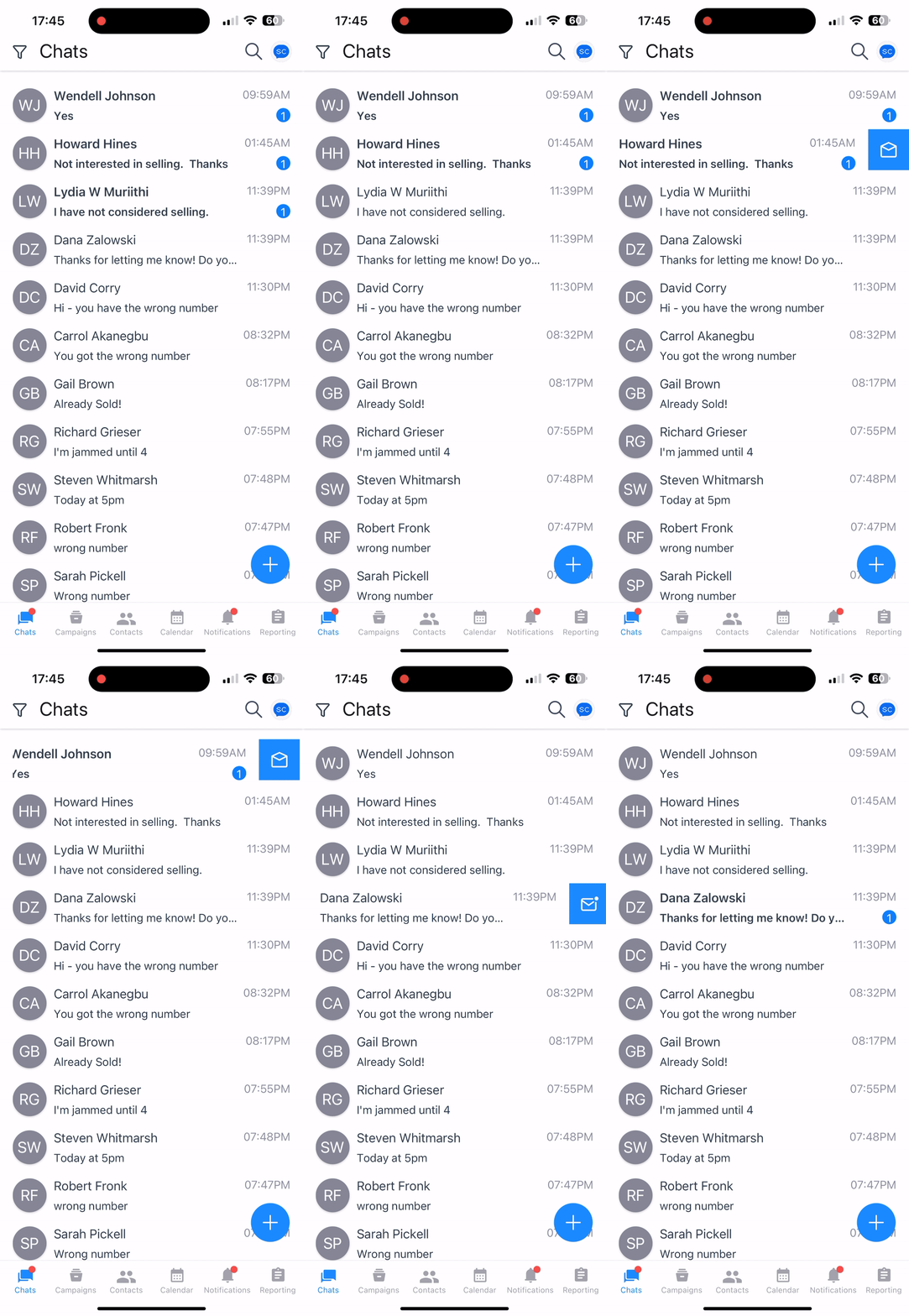
To prevent accidental actions, we have replaced swipe gestures with a more intentional “Long-Press” menu. Simply long-press a conversation window to access actions.

We have heavily optimized the app under the hood, so it moves as fast as you do.
We are introducing two new calling plans designed for high-volume teams: Pro and Elite.

We have upgraded our Answering Machine Detection (AMD) to give you greater control. You can now configure the AI to balance speed versus accuracy based on your campaign data.

We have improved the logic behind our dialer to ensure you remain compliant without manual intervention.
We have enhanced the interface to provide transparency into exactly what is happening with your campaigns.
Imagine calling a lead to have a personal conversation, only for an automated “Just checking in” text to hit their phone while you are on the line.
We have introduced a new “Pre-Flight Check”. Now, before you send a message or make a call, we scan the contact’s timeline to show you exactly what is already scheduled. You can clean up the queue, prevent overlaps, and ensure every interaction lands perfectly.

The new Interactive Trial System allows you to better experience the complete Smarter Contact workflow—from launching campaigns to managing replies—in a simulated environment immediately upon signing up.
We have expanded our compliance engine to cover more languages and more channels, ensuring you stay within carrier guidelines regardless of how you communicate.
Choosing the right phone number for a specific task just got faster. We’ve added visual indicators to the outbound number selector so you never have to guess a number’s capabilities.
We have aligned our calendar system with modern industry standards to ensure better accuracy across timezones.
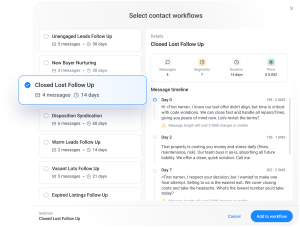
Enroll contacts into a workflow sequence at any time and automate your follow-ups so you
never miss a beat.

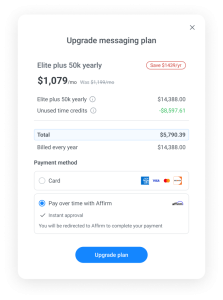
Buy Now, Pay Later (BNPL) gives you the best of both worlds: the savings of a yearly commitment with the flexibility of a monthly payment. This allows you to invest in the Enterprise features you need to grow, like high-volume sending and advanced automation, without the upfront cost.
Here is how it works:

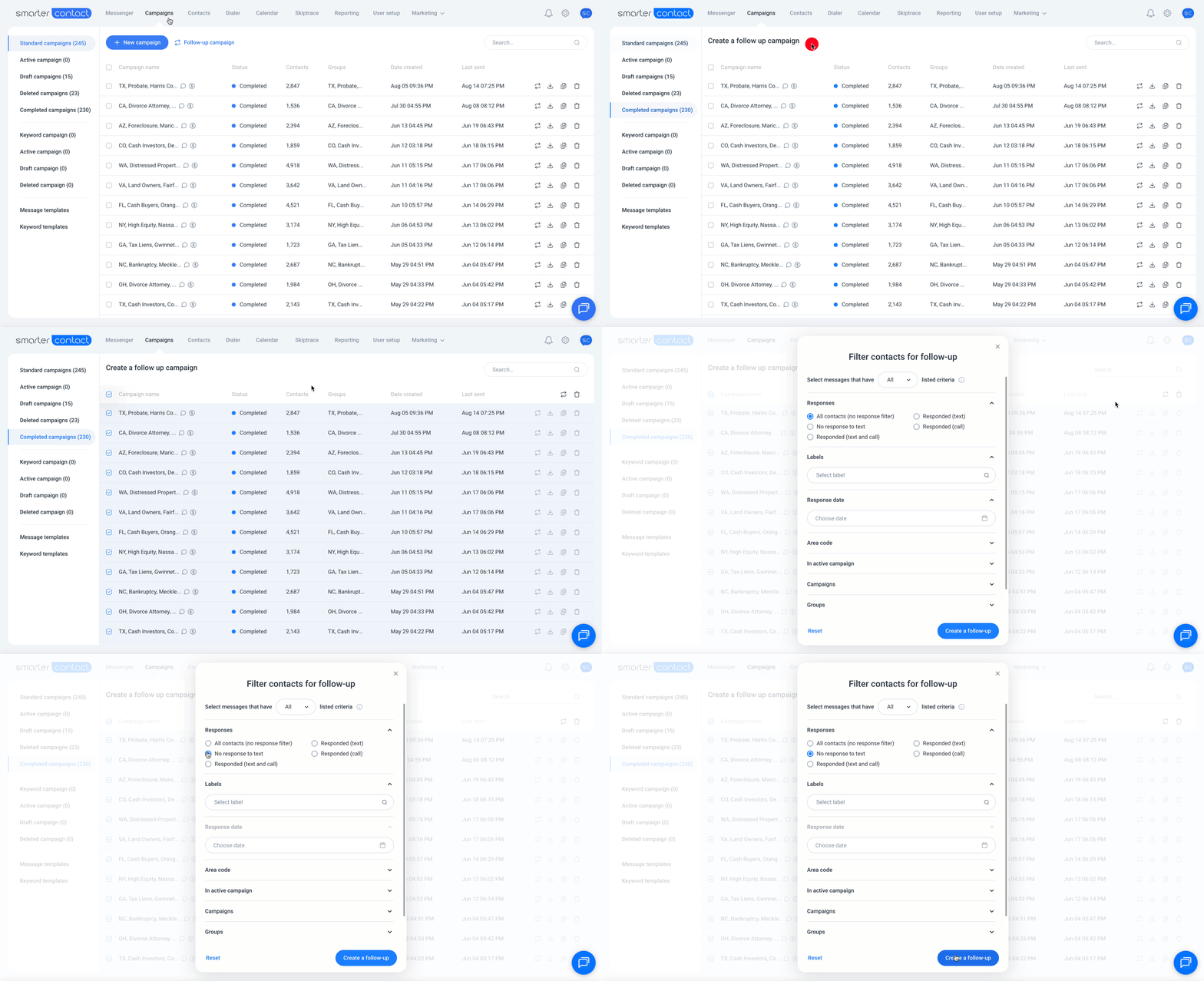
Our improved filtering system gives you the power and flexibility to create follow-ups based on intent or lack thereof.
Your campaigns are now perfectly organized, so that you can find what you need in seconds, not minutes.
The platform now feels noticeably faster and more responsive, especially if you’re working with thousands of contacts.
Notifications should help you win, not distract you. Now with notification setting customizations, you can stay informed of what’s most important for you.
In your Messenger window is where deals live or die. Now you can label, favorite, and prioritize all in our mobile app.
Your campaigns are your revenue engine. When they stall, deals slip through the cracks. Our AI catches issues before they cost you deals.
Turn on AI Insights in your notification settings and let the system work for you. More uptime means more conversations, and more conversations mean more deals.
We’ve extended enterprise-grade compliance protection to better protect you:
Easily shuffle between your team’s accounts to maintain a high level of accountability and see performance across markets from a bird’s-eye view.
We know every dollar counts. That’s why we’re now offering greater savings with longer-term subscriptions, so you can increase your profits even more.
Your database is your most valuable asset. Now, it’s more powerful than ever.
Manual retargeting and follow-up are now a thing of the past. Think of this as a one-click way to move contacts to the right place at the right time.
Your data is your goldmine. We’ve made it easier to put that data to work, whether you’re syncing with a CRM or using AI to find your next opportunity.
Let our platform do the heavy lifting. These new features automate your workflow so you can spend less time managing campaigns and more time in the field.
You can now manage your calls without skipping a beat.
We’ve added safeguards to keep your workflow smooth.
Better reliability, consistency, and crystal-clear audio quality on every call.
New features designed to make SMS and calling campaign management easier, faster, and more intuitive.

No more juggling campaigns one by one. Now you can build bulk follow-up sequences across thousands of contacts with just a few clicks.
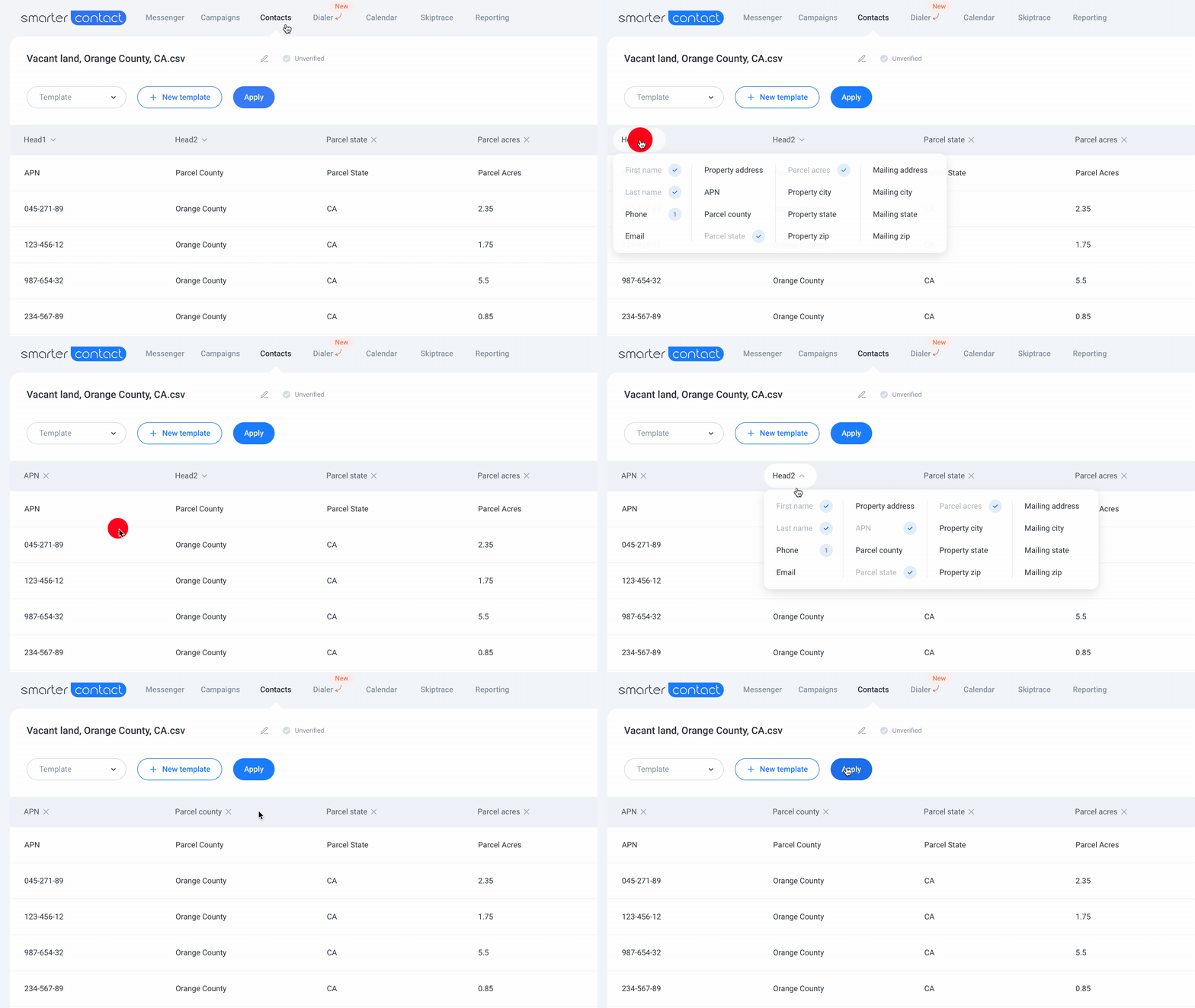
If you invest in land, this one’s for you. When uploading your data sets, you can easily map default land fields quickly and efficiently.
We’ve also polished the experience to keep you focused where it matters most—managing more conversations with greater speed and efficiency to reduce median response time.
Your CRM deserves clean data—and now it gets it.
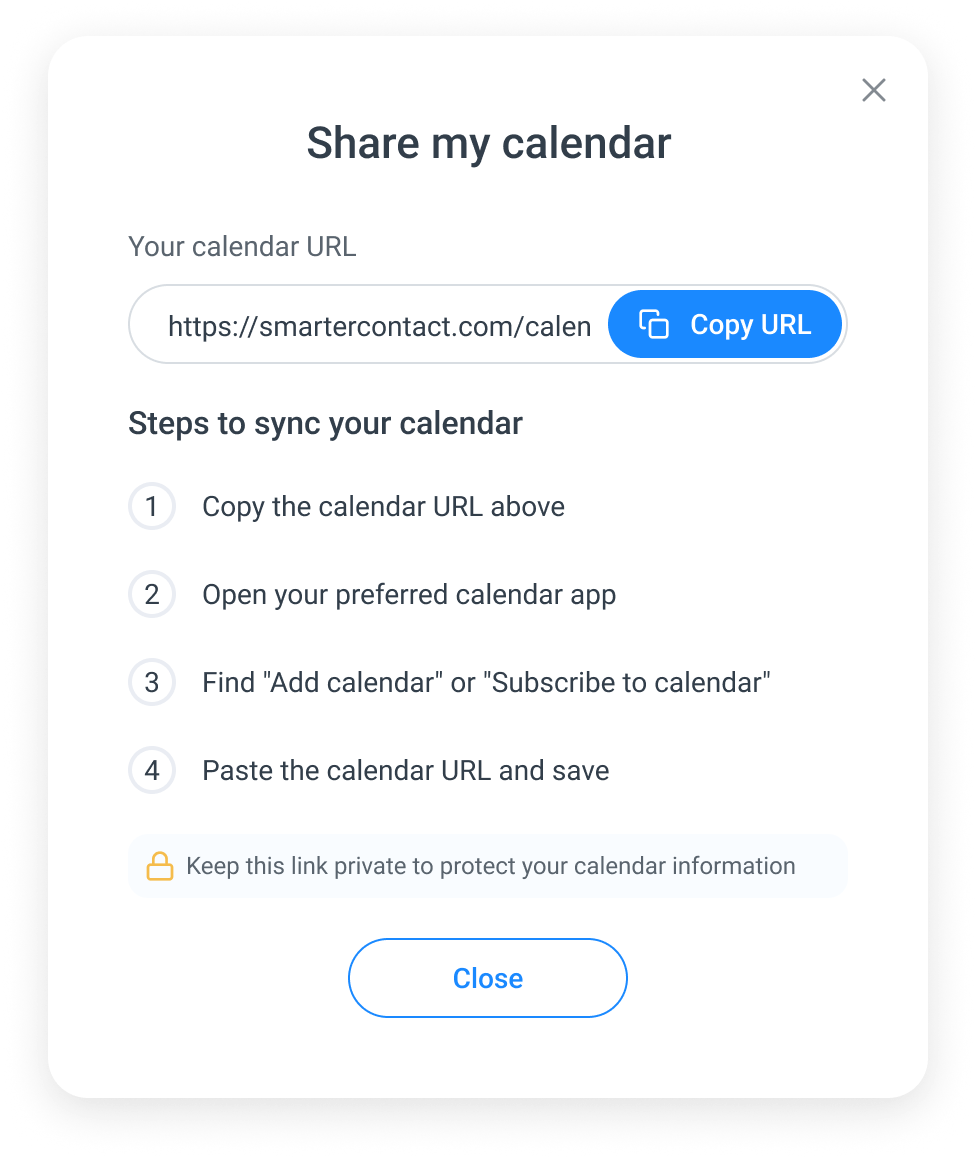
Say goodbye to juggling multiple calendars by simply integrating your calendar and syncing your Smarter Contact appointments.

Unlock deeper understanding of your messaging performance with our new analytical tools.
We’ve significantly upgraded our infrastructure to ensure our platform is more scalable, reliable, and adaptable than ever. Whether you’re a solopreneur or manage a growing team, our software solutions are engineered to meet your performance and volume demands. We can support any texting volumes.
Stay connected and in control with these new updates designed to streamline your workflow and keep you informed while you’re on the go.

Stop guessing who needs follow-up. Track replies and follow up confidently while automation handles the rest.
Expand your reach with landline support while staying protected from messaging errors.
Build trust and boost response rates using your real voice instead of robotic recordings.
Protect your sender reputation and campaign performance with intelligent number management and real-time alerts.
Unique campaign templates preserve your brand’s and phone number’s reputation. This means your carrier block rates will decrease, and your phone number swapping frequency will subsequently decrease.
Optimize your operational efficiency and increase campaign performance with better messaging templates leveraging AI. Here’s what you can do with the Smarter Contact AI:
Now you can schedule drip messages up to a year apart, giving you full control over long-term engagement.
Export all your messaging campaign data in a structured CSV format, perfect for AI analysis and deep performance insights.
Our new AI filtering system helps identify opt-out intent in a broader range of messages:
Let’s face it – most people need multiple follow-ups before they respond. Now you can create targeted follow-ups in seconds with just one click.
Check out this video and create your first automated follow-up campaign.
Your templates will now look significantly more professional and personalized, helping you achieve higher engagement and response rates without any extra effort. No more missed opportunities due to poor formatting!
Your calling game just leveled up with tools that make you sound like a pro.
Watch this quick video to set up your first power dialing campaign in no time.
We all know that timely responses are key in engaging conversations. Now you can:
Say goodbye to distractions! We’ve redesigned “notifications” to help you stay focused and productive. You can now,
Our Power Dialer is now live. Make 5 calls at once, skip voicemails, view your script and contact info during calls, and record calls with notes. Learn more and boost your productivity today!
Smarter ContactAI is now here to revolutionize your campaigns! Gain actionable insights, eliminate guesswork, and seize every opportunity to improve performance.
Experience smarter, data-driven campaigns like never before!
Primary account holders can now enjoy a unified dashboard to track sub-account performance, seamlessly switch between accounts, and access detailed analytics for data-driven decisions and team performance tracking.
Customize your Messenger experience with a new resizable sidebar. Adjust the width of conversation previews and contact cards to your preference, and enjoy a consistent view across all devices. Learn more
Handle large campaigns effortlessly with lightning-fast performance, real-time updates every 500 messages, and seamless optimization for any campaign size.
Our Messenger has undergone significant improvements, now offering enhanced performance for quicker message loading. Effortlessly browse through extensive conversation histories without any lag.
Manage large campaigns with confidence using our new progress loader. You’ll stay updated throughout the campaign preparation process without the need to guess. Learn more
The Macros popup has been revamped for a smoother experience:
The Enterprise SMS counter is now more user-friendly, displaying your remaining SMS quota at a glance. You’ll see the updated format: “Outbound SMS remaining 45,000 of 70,000.”
Stay informed about SMS usage and charges. Whenever your SMS exceeds one credit, you’ll receive a notification during message creation, ensuring you’re aware of additional charges. Learn more
Take control of your notifications. If you prefer fewer interruptions, you can easily toggle off campaign and other notifications—except for critical ones like payment issues, which ensure your account remains active. But hey, an inactive account is not going to get you more leads and deals now, is it?
For campaigns with over 2,500 contacts, you can select at least three phone numbers to boost delivery rates, reduce carrier blocks, and maintain your phone number reputation—ensuring better reach and higher response rates. Learn more
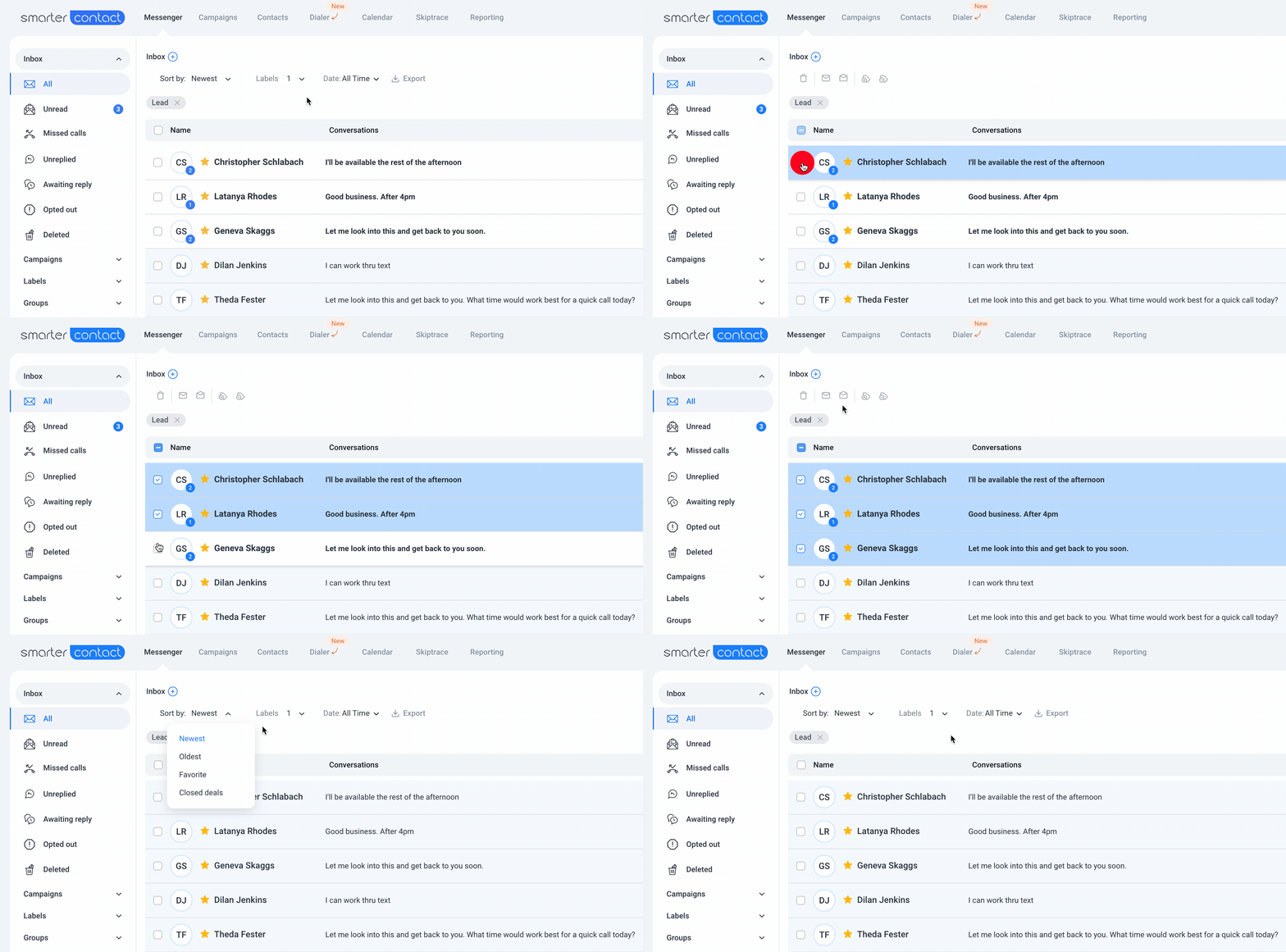
Easily track your conversations with clear visual indicators showing unread messages and missed calls. You can mark conversations as read or unread to manage them efficiently.
We’ve enhanced the inbox view for better clarity, making it easier to see contact details, message previews, and unread message counts at a glance. Learn more
Send longer messages, now up to 306 characters, with an enhanced character counter that keeps track of SMS segments and helps control costs.
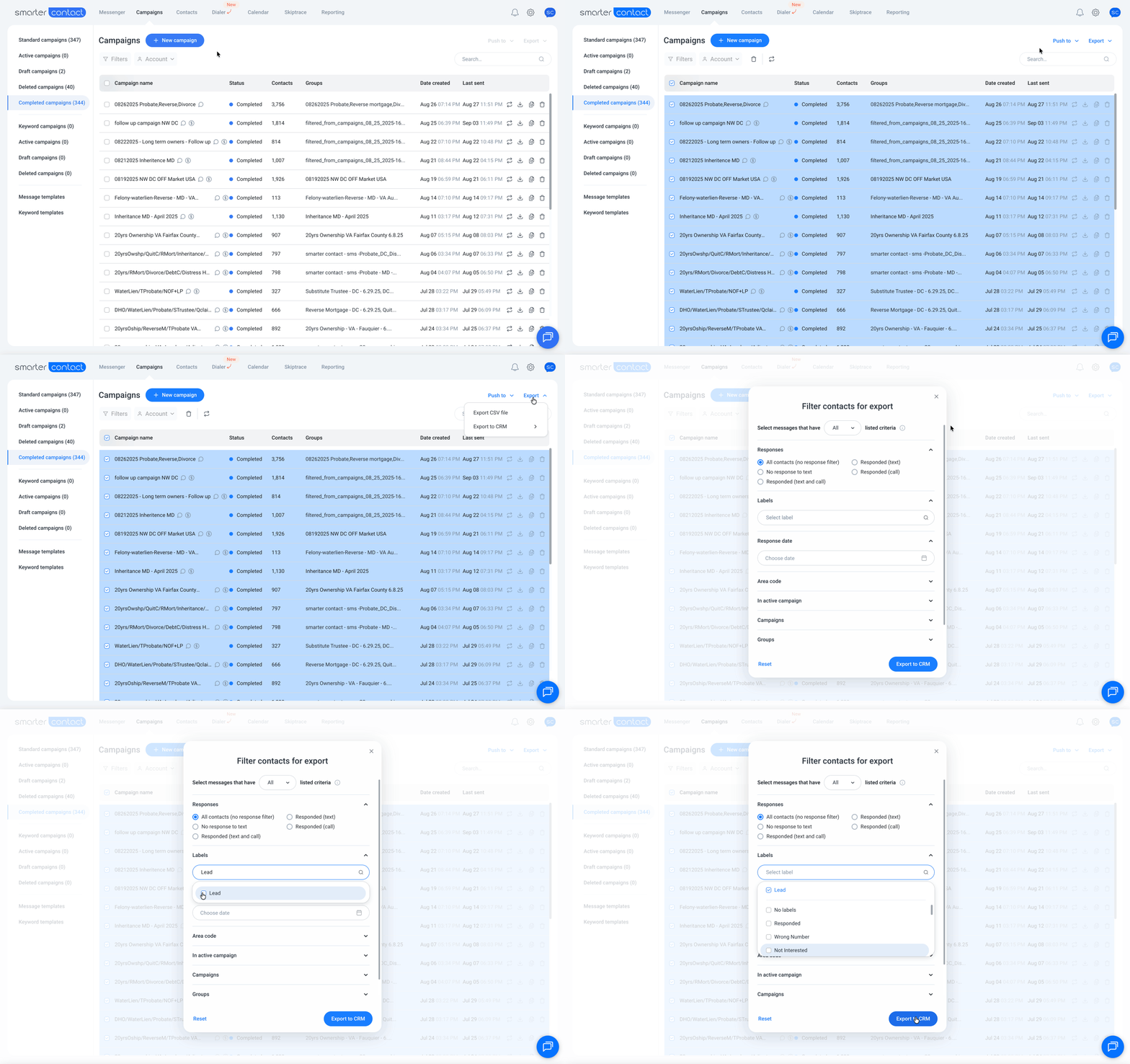
Export contact data across multiple campaigns, groups, or labels with a redesigned UI, making it easier to target and schedule follow-up campaigns. Learn more
The full Group name will now be visible in the Messenger sidebar menu, making it easier to identify your contact groups.
Every new subscriber is assigned a dedicated Customer Success Representative at no additional cost, here to guide you on your journey to closing your first deal
Starting May 2, 2023, all incoming texts and calls are free on all plans, translating to significant savings each month.
Record your calls and play them back later, enabling you to provide feedback to your team and achieve calling proficiency faster.
Set up a custom voicemail message to play when you can’t pick up the phone, adding a personal touch to your communications.
Missed a call? Incoming callers can now leave you a voicemail recording that you can listen to at your convenience.
In addition to 10DLC numbers, you can now use Toll-Free numbers, which are less regulated and easier to set up. Approvals are much faster, allowing you to start messaging right away.
We’ve enhanced the integration with the ability to import data from REISift directly into Smarter Contact at the click of a button.
Auto-respond to contacts who text specific keywords, ensuring instant engagement with your audience.
Dial directly from our in-app keypad, streamlining your call workflows.
View all incoming, outgoing, and missed calls in the conversation log, making sales activity tracking easier than ever.
No need to copy and paste! Click URLs directly from the conversation log on the Messenger page.
Inactive campaigns no longer display in the Campaigns filter, keeping your view uncluttered.
We’ve streamlined the Skiptrace UI for a simpler, more intuitive experience.
Filter conversations by Inbox, Campaigns, Labels, and Groups for efficient management.
You can now export your custom data fields in Messenger, Contacts, and Campaigns, streamlining your data management process.
Find conversations quickly by filtering with custom date ranges. Edit custom header values directly from the contact’s Info tab for easier management.
Select all message template variants at the beginning of your campaign setup and enjoy an updated UI for easier template selection.
With the new button “View mode,” effortlessly see, edit, and delete event details with a simple click.
Filter your billing history by custom date ranges and transaction types, and export all transactions in a .csv file for easy tracking.
Effortlessly sync contacts and records with seamless integration between Smarter Contact and REISift, streamlining your workflows.
You can now add hyperlinks to message templates, making it easier to share information quickly with your customers.
Choose a specific phone number for each campaign to maintain better organization and flexibility.
Hurray! Our user-friendly Mobile App is launched and is now available on iOS and Android! Track and respond to your leads on the go, ensuring you never miss an opportunity.
Easily push your contacts to a custom Group once a campaign ends. This feature allows you to create advanced follow-up automations, helping you close more sales.
Send messages in your 1-on-1 conversations with a delay (e.g., after 15 minutes), giving you more control over timing.
Enable or disable incoming calls with a simple toggle, providing greater flexibility in managing calls.
Macros have a new name and a better experience: Quick Replies. These are the same time-saving snippets you use to respond to motivated sellers, but with the power-user controls you’ve asked for:
Quarterly and yearly Elite Plus (Committed use) plans now receive their entire text credit allocation at the start of the cycle, rather than month by month. Quarterly plans get three times the monthly allowance on day one, yearly plans get twelve times. It resets on your renewal date.
That means one date to plan around, and the flexibility to spend your allocation on whatever schedule your pipeline calls for. Front-load a big push in month one, or pace it out. Your call.
We monitor your number health continuously and surface trouble at the very first sign, giving you room to swap in a fresh number and keep your momentum.
Import inbound leads from your website, Facebook Ads, Google Ads, or any external source with consent tracking built in.

Have you ever accidentally sent an automated text to a seller while an agent was already calling them? We’ve centralized your communication history, so your team knows exactly what campaigns are touching each contact in your database

See how many unread messages you need to respond to without even opening the mobile app.
To prevent accidental actions, we have replaced swipe gestures with a more intentional “Long-Press” menu. Simply long-press a conversation window to access actions.

We are introducing two new calling plans designed for high-volume teams: Pro and Elite.

Imagine calling a lead to have a personal conversation, only for an automated “Just checking in” text to hit their phone while you are on the line.
We have introduced a new “Pre-Flight Check”. Now, before you send a message or make a call, we scan the contact’s timeline to show you exactly what is already scheduled. You can clean up the queue, prevent overlaps, and ensure every interaction lands perfectly.

The new Interactive Trial System allows you to better experience the complete Smarter Contact workflow—from launching campaigns to managing replies—in a simulated environment immediately upon signing up.
Enroll contacts into a workflow sequence at any time and automate your follow-ups so you
never miss a beat.

Buy Now, Pay Later (BNPL) gives you the best of both worlds: the savings of a yearly commitment with the flexibility of a monthly payment. This allows you to invest in the Enterprise features you need to grow, like high-volume sending and advanced automation, without the upfront cost.
Here is how it works:

Your campaigns are your revenue engine. When they stall, deals slip through the cracks. Our AI catches issues before they cost you deals.
Turn on AI Insights in your notification settings and let the system work for you. More uptime means more conversations, and more conversations mean more deals.
Manual retargeting and follow-up are now a thing of the past. Think of this as a one-click way to move contacts to the right place at the right time.
Let our platform do the heavy lifting. These new features automate your workflow so you can spend less time managing campaigns and more time in the field.
You can now manage your calls without skipping a beat.
We’ve added safeguards to keep your workflow smooth.
New features designed to make SMS and calling campaign management easier, faster, and more intuitive.

Say goodbye to juggling multiple calendars by simply integrating your calendar and syncing your Smarter Contact appointments.

Unlock deeper understanding of your messaging performance with our new analytical tools.
Protect your sender reputation and campaign performance with intelligent number management and real-time alerts.
Unique campaign templates preserve your brand’s and phone number’s reputation. This means your carrier block rates will decrease, and your phone number swapping frequency will subsequently decrease.
Optimize your operational efficiency and increase campaign performance with better messaging templates leveraging AI. Here’s what you can do with the Smarter Contact AI:
Export all your messaging campaign data in a structured CSV format, perfect for AI analysis and deep performance insights.
Our new AI filtering system helps identify opt-out intent in a broader range of messages:
Let’s face it – most people need multiple follow-ups before they respond. Now you can create targeted follow-ups in seconds with just one click.
Check out this video and create your first automated follow-up campaign.
Your templates will now look significantly more professional and personalized, helping you achieve higher engagement and response rates without any extra effort. No more missed opportunities due to poor formatting!
We all know that timely responses are key in engaging conversations. Now you can:
Our Power Dialer is now live. Make 5 calls at once, skip voicemails, view your script and contact info during calls, and record calls with notes. Learn more and boost your productivity today!
Smarter ContactAI is now here to revolutionize your campaigns! Gain actionable insights, eliminate guesswork, and seize every opportunity to improve performance.
Experience smarter, data-driven campaigns like never before!
Primary account holders can now enjoy a unified dashboard to track sub-account performance, seamlessly switch between accounts, and access detailed analytics for data-driven decisions and team performance tracking.
Take control of your notifications. If you prefer fewer interruptions, you can easily toggle off campaign and other notifications—except for critical ones like payment issues, which ensure your account remains active. But hey, an inactive account is not going to get you more leads and deals now, is it?
For campaigns with over 2,500 contacts, you can select at least three phone numbers to boost delivery rates, reduce carrier blocks, and maintain your phone number reputation—ensuring better reach and higher response rates. Learn more
Easily track your conversations with clear visual indicators showing unread messages and missed calls. You can mark conversations as read or unread to manage them efficiently.
Send longer messages, now up to 306 characters, with an enhanced character counter that keeps track of SMS segments and helps control costs.
Export contact data across multiple campaigns, groups, or labels with a redesigned UI, making it easier to target and schedule follow-up campaigns. Learn more
Every new subscriber is assigned a dedicated Customer Success Representative at no additional cost, here to guide you on your journey to closing your first deal
Starting May 2, 2023, all incoming texts and calls are free on all plans, translating to significant savings each month.
Record your calls and play them back later, enabling you to provide feedback to your team and achieve calling proficiency faster.
Set up a custom voicemail message to play when you can’t pick up the phone, adding a personal touch to your communications.
Missed a call? Incoming callers can now leave you a voicemail recording that you can listen to at your convenience.
In addition to 10DLC numbers, you can now use Toll-Free numbers, which are less regulated and easier to set up. Approvals are much faster, allowing you to start messaging right away.
We’ve enhanced the integration with the ability to import data from REISift directly into Smarter Contact at the click of a button.
Auto-respond to contacts who text specific keywords, ensuring instant engagement with your audience.
Dial directly from our in-app keypad, streamlining your call workflows.
View all incoming, outgoing, and missed calls in the conversation log, making sales activity tracking easier than ever.
Filter conversations by Inbox, Campaigns, Labels, and Groups for efficient management.
Filter your billing history by custom date ranges and transaction types, and export all transactions in a .csv file for easy tracking.
Effortlessly sync contacts and records with seamless integration between Smarter Contact and REISift, streamlining your workflows.
You can now add hyperlinks to message templates, making it easier to share information quickly with your customers.
Choose a specific phone number for each campaign to maintain better organization and flexibility.
Easily push your contacts to a custom Group once a campaign ends. This feature allows you to create advanced follow-up automations, helping you close more sales.
Send messages in your 1-on-1 conversations with a delay (e.g., after 15 minutes), giving you more control over timing.
Enable or disable incoming calls with a simple toggle, providing greater flexibility in managing calls.
A misspelled custom field means your lead gets a broken message. That’s a bad first impression you can’t take back.

Now, valid custom fields stand out in Messenger, campaigns, templates, quick replies, call scripts, voicemail, and workflows. Invalid ones are highlighted in red, with a hover tip explaining why. Even better, type < and pick the right field from the list instead of guessing the spelling.
Now, every text is exactly how you meant it.
You’ve got a motivated seller on the line. The last thing you need is choppy audio or a dropped connection. Now, you won’t get either.
Your calls now sound better automatically. We’ve added a Call quality setting and switched every account to Auto, so you get the clearest audio your connection can handle without lifting a finger. It applies to every call you make, 1:1 and dialer, and your very next call picks it up. If your internet is slow, choose Low to keep the call steady. If you’re on a strong connection, choose High for the crispest audio possible.

Clearer calls. Better conversations. More deals.
Wi-Fi drops happen. Losing the lead shouldn’t.
If your connection blips, your call now reconnects automatically. No redial, no awkward “sorry, you cut out.” The call button and the dialer Online switch also show exactly what’s happening, with tooltips that tell you when you’re connecting and when something needs your attention. And while a 1:1 call is active, the call button stays locked until you wrap it up, so you’ll never accidentally dial two leads at once.
Say goodbye to silent call failures.
“Press 1 for an agent” no longer stops your dialer campaign. Press digits on any active dialer call to navigate IVRs, reach extensions, and get to the right person. It works exactly like the keypad on your 1:1 calls.

Submitted your Brand registration? You don’t have to sit and wait. Place 1:1 calls on your messaging numbers while your brand is in review, and buy more 10DLC numbers from the Messaging campaign setup so they’re ready the moment you’re approved.
Until now, search covered names and phone numbers. Now, it also covers addresses, emails, parcel details, and every custom field you’ve set up. And when you already know what you’re looking for, you can point search at a single field instead of the whole contact.
Click Advanced search and you’ll see two sections.

Your choice sticks. The field you pick carries across sessions and between Messenger and Contacts, so you don’t reset it every time. A summary line above your results shows which field is selected, what it expects, and how many matched.
Message content search is live in both Messenger and Contacts, under Detailed search alongside address, email, and custom fields. Instead of finding a contact by their details, you can find them by what was actually said in the conversation.
It understands related forms of a word, so searching selling also turns up sells and seller. And your filters still apply, so Unread, Missed calls, and Unreplied keep working alongside it. By default it leaves campaign text out, so one template sent to hundreds of contacts doesn’t bury the reply you’re looking for. Switch to All messages to include it.
Names and phone numbers still match on a fragment, so har finds Harold exactly as it does today.
The new fields match whole words instead, with each value split at its punctuation. That means 9549 Elbow Lake Rd answers to elbow, and a dashed APN answers to its middle section. It also means tam won’t find Tampa Bay, and a ZIP needs all five digits.
Attaching media is more predictable, and you can see what it costs while you build the message.
Message limits went up across the app. They differ by surface, because each one gets used differently:
If you run more than one brand, you have been juggling more than one login. Separate credentials, separate tabs, and a sign-out every time you need to check on another business.
With our new multi-account structure. Link all of your brands under one account, see them together, and move between them without signing in and out. Your account team gets your brands connected, and from there everything lives in one place.

Every Messenger page features a single, unified Filters panel. You can easily combine multiple parameters to drill down into your leads:
Build a filter that perfectly targets your hot leads and save it. Saved filters now live in your left-side menu. Build it once. Use it forever.
Data integrity makes or breaks your ROI. We’ve introduced real-time field validation to ensure the health of your database when uploading new lists.

We have heavily optimized the app under the hood, so it moves as fast as you do.
We have upgraded our Answering Machine Detection (AMD) to give you greater control. You can now configure the AI to balance speed versus accuracy based on your campaign data.

We have improved the logic behind our dialer to ensure you remain compliant without manual intervention.
We have enhanced the interface to provide transparency into exactly what is happening with your campaigns.
We have expanded our compliance engine to cover more languages and more channels, ensuring you stay within carrier guidelines regardless of how you communicate.
Choosing the right phone number for a specific task just got faster. We’ve added visual indicators to the outbound number selector so you never have to guess a number’s capabilities.
We have aligned our calendar system with modern industry standards to ensure better accuracy across timezones.
Our improved filtering system gives you the power and flexibility to create follow-ups based on intent or lack thereof.
Your campaigns are now perfectly organized, so that you can find what you need in seconds, not minutes.
The platform now feels noticeably faster and more responsive, especially if you’re working with thousands of contacts.
Notifications should help you win, not distract you. Now with notification setting customizations, you can stay informed of what’s most important for you.
In your Messenger window is where deals live or die. Now you can label, favorite, and prioritize all in our mobile app.
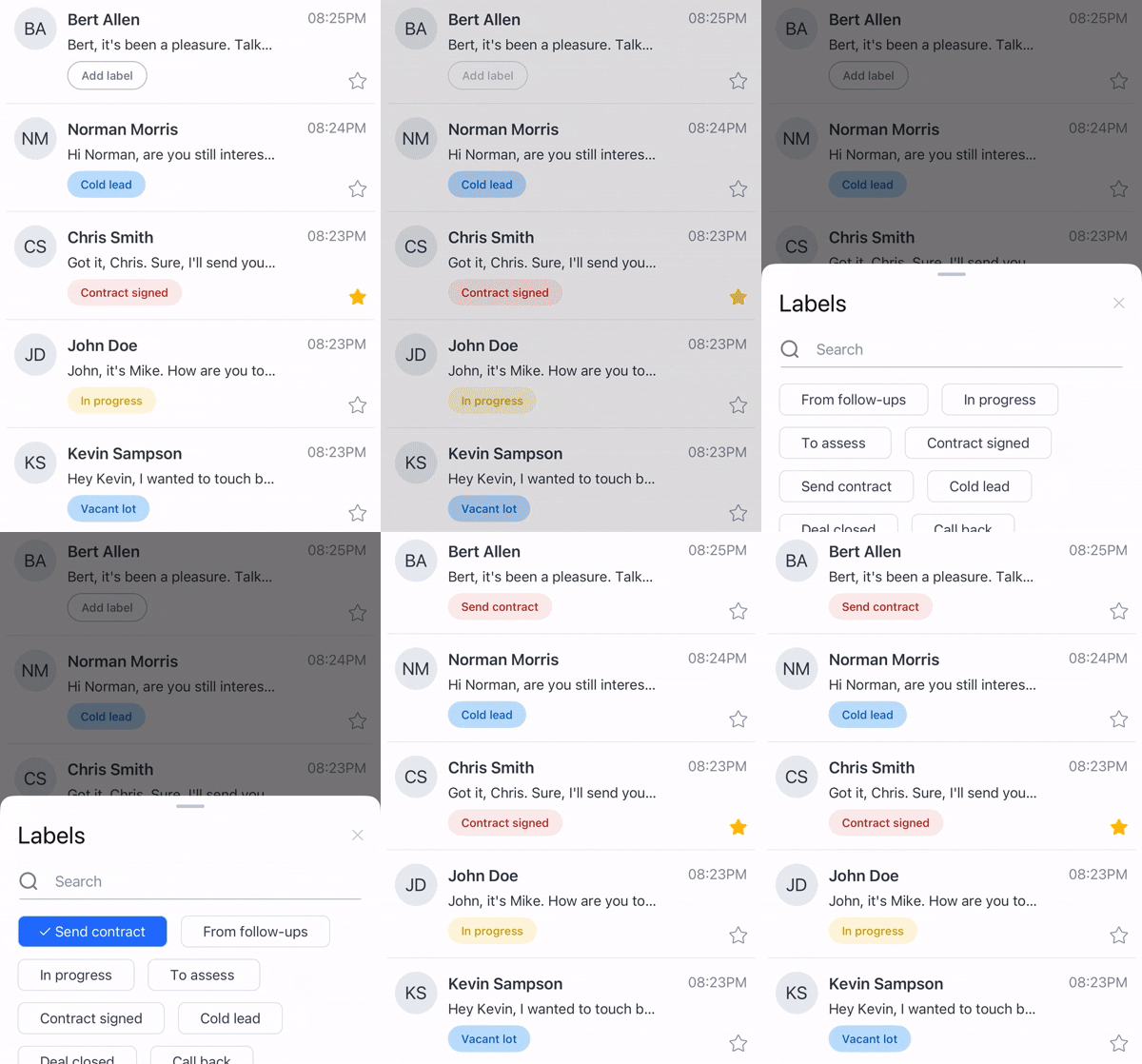
We’ve extended enterprise-grade compliance protection to better protect you:
Easily shuffle between your team’s accounts to maintain a high level of accountability and see performance across markets from a bird’s-eye view.
We know every dollar counts. That’s why we’re now offering greater savings with longer-term subscriptions, so you can increase your profits even more.
Your database is your most valuable asset. Now, it’s more powerful than ever.
Your data is your goldmine. We’ve made it easier to put that data to work, whether you’re syncing with a CRM or using AI to find your next opportunity.
Better reliability, consistency, and crystal-clear audio quality on every call.
No more juggling campaigns one by one. Now you can build bulk follow-up sequences across thousands of contacts with just a few clicks.
If you invest in land, this one’s for you. When uploading your data sets, you can easily map default land fields quickly and efficiently.
We’ve also polished the experience to keep you focused where it matters most—managing more conversations with greater speed and efficiency to reduce median response time.
Your CRM deserves clean data—and now it gets it.
We’ve significantly upgraded our infrastructure to ensure our platform is more scalable, reliable, and adaptable than ever. Whether you’re a solopreneur or manage a growing team, our software solutions are engineered to meet your performance and volume demands. We can support any texting volumes.
Stay connected and in control with these new updates designed to streamline your workflow and keep you informed while you’re on the go.

Stop guessing who needs follow-up. Track replies and follow up confidently while automation handles the rest.
Expand your reach with landline support while staying protected from messaging errors.
Build trust and boost response rates using your real voice instead of robotic recordings.
Now you can schedule drip messages up to a year apart, giving you full control over long-term engagement.
Your calling game just leveled up with tools that make you sound like a pro.
Watch this quick video to set up your first power dialing campaign in no time.
Say goodbye to distractions! We’ve redesigned “notifications” to help you stay focused and productive. You can now,
Customize your Messenger experience with a new resizable sidebar. Adjust the width of conversation previews and contact cards to your preference, and enjoy a consistent view across all devices. Learn more
Handle large campaigns effortlessly with lightning-fast performance, real-time updates every 500 messages, and seamless optimization for any campaign size.
Our Messenger has undergone significant improvements, now offering enhanced performance for quicker message loading. Effortlessly browse through extensive conversation histories without any lag.
Manage large campaigns with confidence using our new progress loader. You’ll stay updated throughout the campaign preparation process without the need to guess. Learn more
The Macros popup has been revamped for a smoother experience:
The Enterprise SMS counter is now more user-friendly, displaying your remaining SMS quota at a glance. You’ll see the updated format: “Outbound SMS remaining 45,000 of 70,000.”
Stay informed about SMS usage and charges. Whenever your SMS exceeds one credit, you’ll receive a notification during message creation, ensuring you’re aware of additional charges. Learn more
We’ve enhanced the inbox view for better clarity, making it easier to see contact details, message previews, and unread message counts at a glance. Learn more
The full Group name will now be visible in the Messenger sidebar menu, making it easier to identify your contact groups.
No need to copy and paste! Click URLs directly from the conversation log on the Messenger page.
Inactive campaigns no longer display in the Campaigns filter, keeping your view uncluttered.
We’ve streamlined the Skiptrace UI for a simpler, more intuitive experience.
You can now export your custom data fields in Messenger, Contacts, and Campaigns, streamlining your data management process.
Find conversations quickly by filtering with custom date ranges. Edit custom header values directly from the contact’s Info tab for easier management.
Select all message template variants at the beginning of your campaign setup and enjoy an updated UI for easier template selection.
With the new button “View mode,” effortlessly see, edit, and delete event details with a simple click.
Macros have a new name and a better experience: Quick Replies. These are the same time-saving snippets you use to respond to motivated sellers, but with the power-user controls you’ve asked for:
See how many unread messages you need to respond to without even opening the mobile app.
To prevent accidental actions, we have replaced swipe gestures with a more intentional “Long-Press” menu. Simply long-press a conversation window to access actions.

We have heavily optimized the app under the hood, so it moves as fast as you do.
Notifications should help you win, not distract you. Now with notification setting customizations, you can stay informed of what’s most important for you.
In your Messenger window is where deals live or die. Now you can label, favorite, and prioritize all in our mobile app.
Your campaigns are your revenue engine. When they stall, deals slip through the cracks. Our AI catches issues before they cost you deals.
Turn on AI Insights in your notification settings and let the system work for you. More uptime means more conversations, and more conversations mean more deals.
New features designed to make SMS and calling campaign management easier, faster, and more intuitive.

Stay connected and in control with these new updates designed to streamline your workflow and keep you informed while you’re on the go.
Filter conversations by Inbox, Campaigns, Labels, and Groups for efficient management.
Hurray! Our user-friendly Mobile App is launched and is now available on iOS and Android! Track and respond to your leads on the go, ensuring you never miss an opportunity.
This website uses cookies to improve functionality, analyze performance, and personalize your experience. You can accept or decline non-essential cookies at any time. To learn more, please read our Privacy Policy.
Manage your cookie preferences below:
Essential cookies enable basic functions and are necessary for the proper function of the website.
Marketing cookies are used to follow visitors to websites. The intention is to show ads that are relevant and engaging to the individual user.
Google Tag Manager simplifies the management of marketing tags on your website without code changes.
You can find more information in our Cookie Policy and Privacy Policy.